
Answered
Printing Problem 3 copies and collate
When I go to print from Acrobat Adobe Reader DC, the default printing goes to 3 copies and the collate box is checked. I cannot change it.

When I go to print from Acrobat Adobe Reader DC, the default printing goes to 3 copies and the collate box is checked. I cannot change it.
Hello Doug,
We're sorry for the trouble you had with Adobe Reader, please sign out from Adobe Reader, reboot the machine once. Launch Adobe Reader back and sign in.
Please go to the Advanced Printer Properties from the Print Dialog box>select the Properties>Advanced>under Paper/Output>Change the Copy Count and then uncheck 'Collated' option>Click Ok>Then Click OK again and check.
This feature is a printer property, so you have to look for the Collated option in the Advanced Property of the Printer.
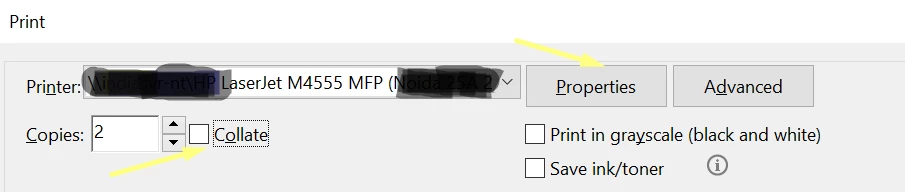
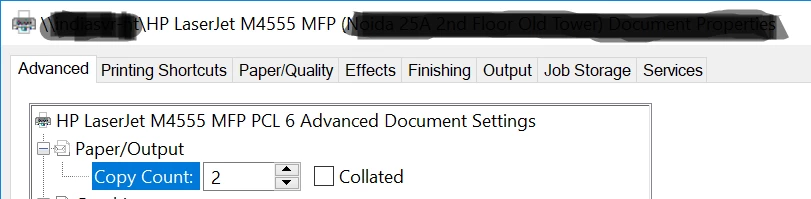
You can also refer and try the suggestion from the following Adobe discussion Adobe reader prints multiple copies of documents in wrong order: 11 22 33 instead of 123 123
Is it a Mac or Windows machine and what is the version of the OS installed?
What is the dot version of Adobe Reader installed? To identify refer to Identify the product and its version for Acrobat and Reader DC
Make sure that you have the latest version of the printer driver/firmware installed.
Let us know how it goes and share your observation.
Thanks,
Anand Sri.
Already have an account? Login
No account yet? Create an account
Enter your E-mail address. We'll send you an e-mail with instructions to reset your password.


 AdChoices