


Printing Problem with Latest Release (2019.008.20071)
We have a significant problem with the latest release of Acrobat DC, can anyone please help?
We publish booklets which are produced in MS Publisher and saved there as pdfs. People then buy the pdfs and print them at home. Yesterday we found that the latest release of Acrobat DC prints the booklets wrongly, and not consistently. Here are the problems:
We create a map in Photoshop Elements 14 with multiple layers, then save it as a gif, then import it into MS Publisher (Office 365). We put a border on it in Publisher. Then we save it as a pdf. When viewed in Acrobat DC it views as it should, but when we print it it comes out which large white bars as follows:
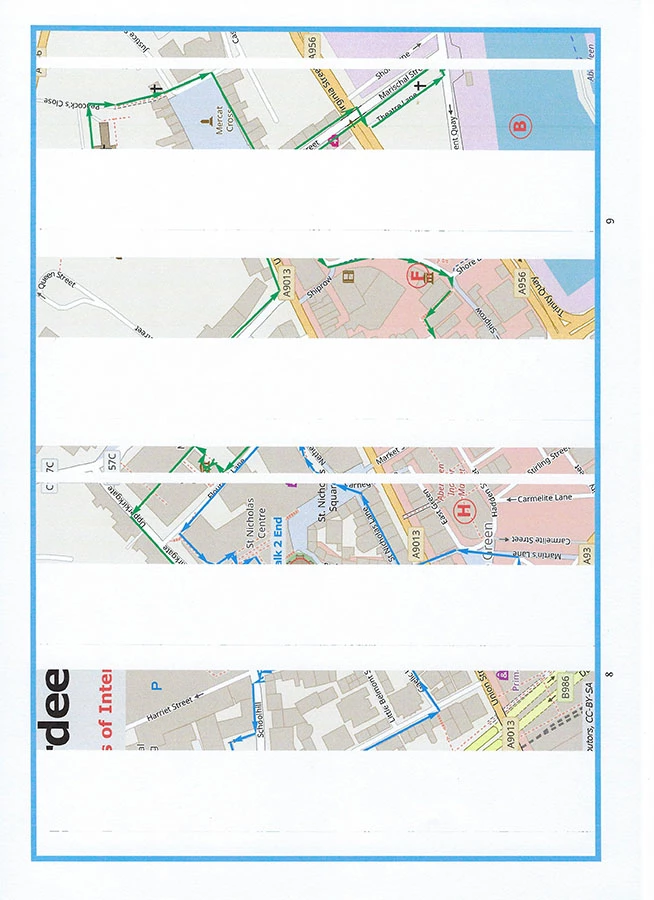
This happens all of the time with the same map, but some maps do print OK (but not many!). When we print in the previous version of Acrobat DC it always prints as we see it on the screen. If we print from Acrobat Pro X it prints just fine too. We have used 4 different Windows 10 PCs and 4 different printers, both HP and Canon. Always the same results.
We also insert a jpeg into Publisher and add a style (looks like a picture frame). It has text around it. When we print from Acrobat DC it loses its formatting. Here is a picture of when it prints correctly, and when it doesn't:
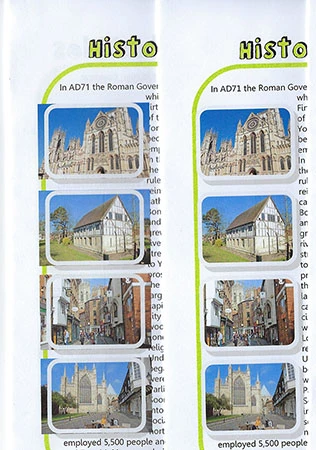
In terms of what does work: inserting a gif from Photoshop with no layers or anything else added - this works fine.
We have tried lots of things to overcome or get round the problems, but not found anything yet. Any help is welcome.

 AdChoices