

Participant
November 15, 2021
Question

Problem opening a document

  • November 15, 2021
  • 1 reply
  • 371 views

Hi,
I have a problem when I open a document.
When I open the document I get the following error message:
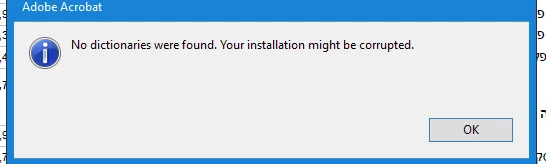
What I have to do ?

This topic has been closed for replies.

1 reply

Harsh Vardhan Pareek
Community Manager
Community Manager
November 15, 2021

Hi @Yaniv5ECD 


Hope you are doing well.

As per the issue description that you are getting the error when you open a document. Kindly try to repair the application using Help> Repair installation. If this doesn't resolve the issue then check if the application is updated to the latest version? 

To check if there is any update available, Go to Help> Check for updates.

If this doesn't work then try downloading dictionary pack from: https://helpx.adobe.com/acrobat/kb/windows-font-packs-32-bit-reader.html


Let us know if that helps.


Thanks,

Harsh

Yaniv5ECDAuthor
Participant
November 23, 2021

Hi,


I still have a problem and get an error when i open a document.


Thanks,

Yaniv

Harsh Vardhan Pareek
Community Manager
Community Manager
November 23, 2021

Kindly provide us few more details to understand the issue better.

1. Application version?

2. Is it showing with a particular PDF or with all PDFs?

Here is a discussion link on a similar issue, please follow the steps suggested there:

https://community.adobe.com/t5/acrobat-sdk-discussions/no-dictionaries-were-found/m-p/12475271


Let us know if it helps.


Thanks,

Harsh