

Problem sending mail from Adobe Acrobat DC Reader via APPV
We are running a HyperV enviroment with some local install applications and XenApp. An APPV publiched application is able to open upp PDF files that the program creates and display them but when using the build-in function in Adobe, sending it as a mail the problem occurs.
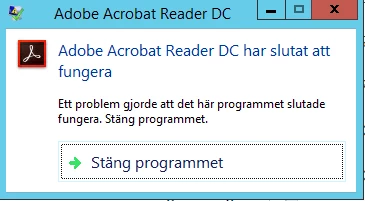
Translation: Adobe Acrobat Reader DC has stopped working. An error has oocured that has made this program stopped working. Close the program.
The windows Event viewer is showing this error:
Log Name: | Application |
| Source: | Application Error |
| Date: | 2017-02-28 16:12:30 |
| Event ID: | 1000 |
Task Category: (100)
| Level: | Error |
| Keywords: | Classic |
| User: | N/A |
| Computer: | computername |
Description:
Faulting application name: AcroRd32.exe, version: 15.23.20070.19033, time stamp: 0x58a745fb
Faulting module name: ntdll.dll, version: 6.3.9600.18233, time stamp: 0x56bb4e1d
Exception code: 0xc0000005
Fault offset: 0x000431f2
Faulting process id: 0x4afc
Faulting application start time: 0x01d291d5051ea9c5
Faulting application path: C:\Program Files (x86)\Adobe\Acrobat Reader DC\Reader\AcroRd32.exe
Faulting module path: C:\Windows\SYSTEM32\ntdll.dll
Report Id: 52037214-fdc8-11e6-8274-f25affb621a4
Faulting package full name:
Faulting package-relative application ID:
Event Xml:
<Event xmlns="http://schemas.microsoft.com/win/2004/08/events/event">
<System>
| <Provider Name="Application Error" /> | |
| <EventID Qualifiers="0">1000</EventID> | |
| <Level>2</Level> | |
| <Task>100</Task> | |
| <Keywords>0x80000000000000</Keywords> | |
| <TimeCreated SystemTime="2017-02-28T15:12:30.000000000Z" /> | |
| <EventRecordID>98157</EventRecordID> | |
| <Channel>Application</Channel> | |
| <Computer>MTRCLNXA7D-001.motorit.net</Computer> | |
| <Security /> |
</System>
<EventData>
| <Data>AcroRd32.exe</Data> | |
| <Data>15.23.20070.19033</Data> | |
| <Data>58a745fb</Data> | |
| <Data>ntdll.dll</Data> | |
| <Data>6.3.9600.18233</Data> | |
| <Data>56bb4e1d</Data> | |
| <Data>c0000005</Data> | |
| <Data>000431f2</Data> | |
| <Data>4afc</Data> | |
| <Data>01d291d5051ea9c5</Data> | |
| <Data>C:\Program Files (x86)\Adobe\Acrobat Reader DC\Reader\AcroRd32.exe</Data> | |
| <Data>C:\Windows\SYSTEM32\ntdll.dll</Data> | |
| <Data>52037214-fdc8-11e6-8274-f25affb621a4</Data> | |
| <Data> | |
| </Data> | |
| <Data> | |
| </Data> |
</EventData>
</Event>
We have implemented registry key HKLM\Software\WOW6432Node\adobe\adobe reader\dc\featurestate\4163520(dword)=0 but still the issue persist.
Tried to update both Office and Adobe but the problem remains.
There is no issue to open a PDF file from the desktop or a shared drive and mail it, only from an APPV application.
Enviroment:
Windows 2012 R2
XenApp 7.13
Outlook 365 2016 with latest uppdates, version 1701 build 7766.2060
Adobe Acrobat Reader, DC version 2015-023-20070
Tacdis (APPV application)
 AdChoices