This topic has been closed for replies.
Correct answer Amin24627969j10t

I contacted the supporting service involved with the Form, they sent me a fault-free version of the Form without the problem under discussion.

So .... thank you all my friends for your helpful replies.

2 replies

Amin24627969j10tAuthorCorrect answer
Inspiring
May 30, 2022

I contacted the supporting service involved with the Form, they sent me a fault-free version of the Form without the problem under discussion.

So .... thank you all my friends for your helpful replies.

Harsh Vardhan Pareek
Participating Frequently
May 27, 2022

Hi @Amin24627969j10t 


Sorry for the trouble. 

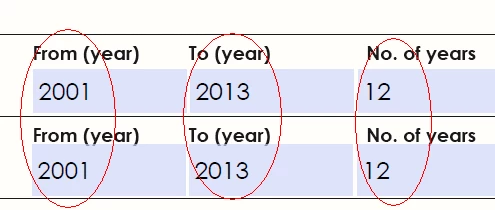
It happens because you have name both the fields as same, change the name of the fields, like if one is "years" name other as "years2". 

Let us know if that helps.


Thanks,

Harsh

Inspiring
May 27, 2022

Actually I didn't build the form so I can not edit it. It's an information form from an institute.

anyway, thank you for your reply.... I look forward for any other solution from you.

radzmar
Community Expert
Community Expert
May 27, 2022

In Reader you can't do anything, I'm afraid. You'll need Acrobat to check the form fields and apply neccessary changes to to them or you contact the author of the form to ask him to fix the form.