
Participating Frequently
April 11, 2022
Answered

Problem with font display in Reader

  • April 11, 2022
  • 2 replies
  • 49892 views

We’re having a weird problem with opening documents using Adobe Acrobat Reader DC.

When we open the document some of it’s text is displayed incorrectly – instead of being where it should be, it is scattered in a weird way (black boxes are there to hide clients information 🙂 ) : 
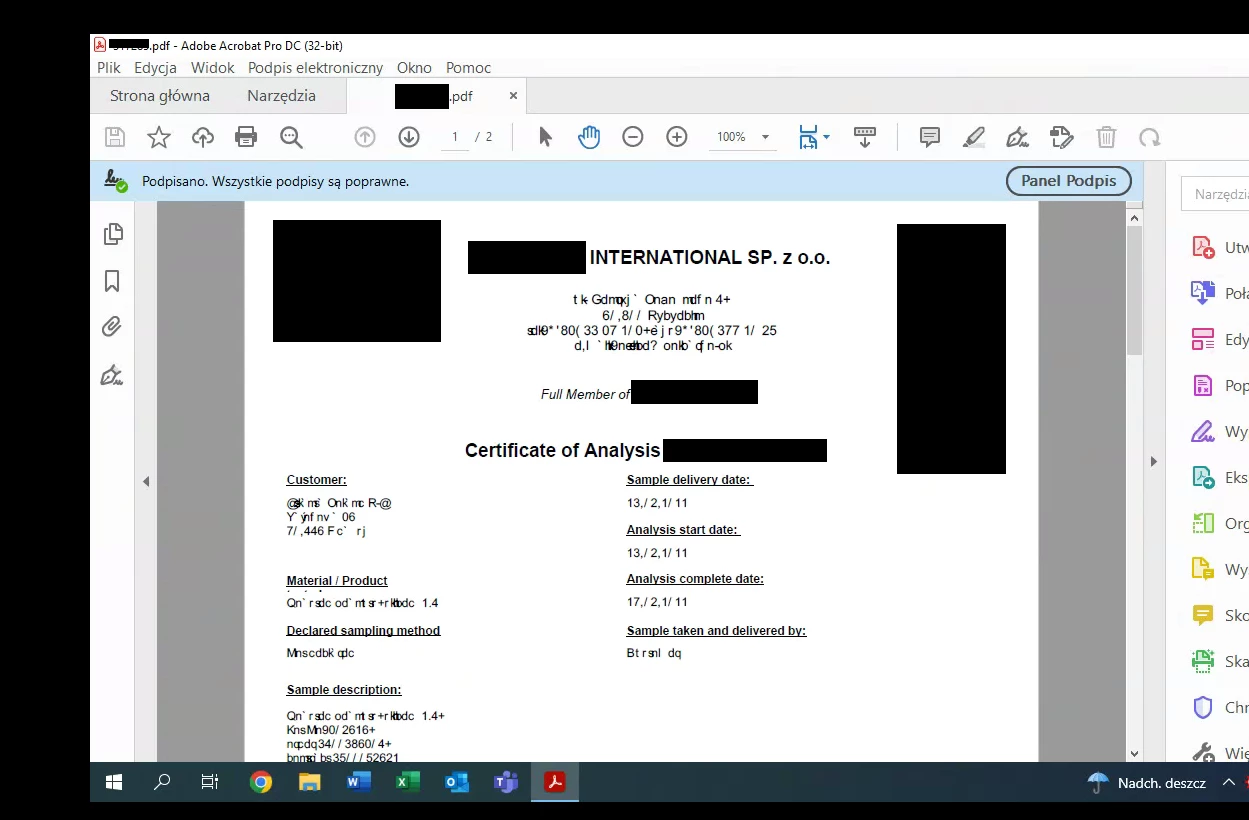


It only occurs on one computer when opening documents from one specific provider and only in Reader – in web browsers or foxit reader it works fine.


We tried reinstalling Adobe Acrobat Reader DC, changing it’s settings, installing fonts, different versions of Reader and even performing a clean reinstall of Windows 10 Pro.


We were able to fix this issue, but only for a moment, most of the time it breaks when the user tries to print the document, sometimes simply when it is opened.

What we did was copying contents of AppData (Local/LocalLow/Roaming) adobe folders from another user on this PC (it is in a domain) into AppData of the target user.


I’d be grateful for any help on this topic 😊

Correct answer Dre-T1102

Had a user with this error and noticed these are character map fonts, these kind of fonts are local to the computer and can sometimes be displayed like this in web pages for organizational use, I hadn't noticed they could be on Adobe until today. I went into Preferences --> Page Display (Right column) --> Under rendering, turn "Use Local Fonts" off. 

This turning this setting off seemed to have fixed the page instantly for this user, they only had this issue from a specific sender, not all their documents were like this. I told them they may need to re-enable the setting if they ever encounter font issues with other documents from other providers that they receive documents from.

2 replies

Dre-T1102Correct answer
Participant
May 3, 2023

Had a user with this error and noticed these are character map fonts, these kind of fonts are local to the computer and can sometimes be displayed like this in web pages for organizational use, I hadn't noticed they could be on Adobe until today. I went into Preferences --> Page Display (Right column) --> Under rendering, turn "Use Local Fonts" off. 

This turning this setting off seemed to have fixed the page instantly for this user, they only had this issue from a specific sender, not all their documents were like this. I told them they may need to re-enable the setting if they ever encounter font issues with other documents from other providers that they receive documents from.

Amal.
Community Manager
Community Manager
April 12, 2022

Hi there


Hope you are doing well and sorry for the trouble.


It looks like the required font is not properly embedded into the PDF file, it is not present on the system or you may not have the required permission to use the font. For more info about font embedding please check the help page https://helpx.adobe.com/acrobat/using/pdf-fonts.html


Please goto Edit (Win), Adobe Acrobat (Mac) > Preferences > Page Display, Under rendering, select 'Use Local Font' > Click OK and reboot the computer once and check.


Regards

Amal

Participating Frequently
April 14, 2022

Hello,


Unfortunately I've already tried changing this setting and it didn't help 😞 

As I said I tried playing with settings before and was't able to get any results.


Regards,

Oskar 

Amal.
Community Manager
Community Manager
April 14, 2022

Hi there


We are sorry to hear that.


Is this an issue with a particular PDF file or with all the PDFs? Please try with a different PDF file and check.

Also, please share the PDF file in question so that we can check it at our end.


Regards

Amal