SergeiKat
Inspiring
November 19, 2023
Question

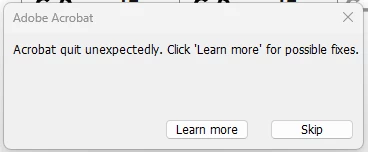
Quits...???
  • November 19, 2023
  • 1 reply
  • 737 views


This pops up often, even though Reader is not even being used - so how can it quit?


It's only just started since 2 PC have been updated to Windows 11, same issue on both.


Compatibility with W.11 maybe...??

This topic has been closed for replies.

1 reply

AnandSri
Legend
November 20, 2023

Hi @SergeiKat 


I hope you are doing well. We're sorry for your trouble with the Acrobat Reader app.

Please restart the machine once, and then use the Acrobat Cleaner tool to remove any corrupt or conflicting installation files of Acrobat Reader: https://www.adobe.com/devnet-docs/acrobatetk/tools/Labs/cleaner.html.


Restart the machine, and then use the URL to download Acrobat Reader: https://helpx.adobe.com/reader/get-started.html.


Please ensure that all the mandatory and optional updates for the operating system are installed.


Let us know if you still experience any issues.


~Anand Sri.

SergeiKat
SergeiKatAuthor
Inspiring
November 27, 2023

AnandSri.

Your suggestion failed to resolve the problem.

It's clear from the numerous reports of this same issue that there is a fundemental problem with the product. That requires a fix from Adobe, not users.

Please address that.


AnandSri
Legend
November 27, 2023

Thanks for sharing the details, @SergeiKat 


If you have tried the above steps and are still experiencing the issue, would you mind collecting the logs from the affected machine and user profile and sharing it with us for further investigation: https://helpx.adobe.com/acrobat/kb/collect-logs-crash-freeze.html


Thanks,

Anand Sri.