
Participating Frequently
November 8, 2019
Answered

RAISE without a handler

  • November 8, 2019
  • 2 replies
  • 3009 views

upgraded to Catalina on MacBook Pro. seemed okay at first   now sometimes document opens and sometimes get error message: "There was a RAISE without a handler. The application will now exit."  Then Reader closes on OK.  


 version adobe acrobat reader DC  Continuous Release 2019.021.20049


is this compatible with Catalina?  how can i get it to work consistently? is there another better version?  is there no longer a free PDF reader from Adobe for Mac Catalina forward?
This topic has been closed for replies.
Correct answer vdobhal

Hi,


Adobe Acrobat and Reader official update containing the fix for this issue is now available. This update will be automatically pushed to all existing installations of Acrobat and Reader. If you want, you may also manually trigger the update by opening the application and going to Help > Check for Updates.

More information about this release is here: Release notes 


Please try it out and let us know your feedback. Thanks for your patience and support!


Regards,

Vinod

2 replies

vdobhalCorrect answer
Adobe Employee
November 13, 2019

Hi,


Adobe Acrobat and Reader official update containing the fix for this issue is now available. This update will be automatically pushed to all existing installations of Acrobat and Reader. If you want, you may also manually trigger the update by opening the application and going to Help > Check for Updates.

More information about this release is here: Release notes 


Please try it out and let us know your feedback. Thanks for your patience and support!


Regards,

Vinod

MBLRAuthor
Participating Frequently
November 13, 2019

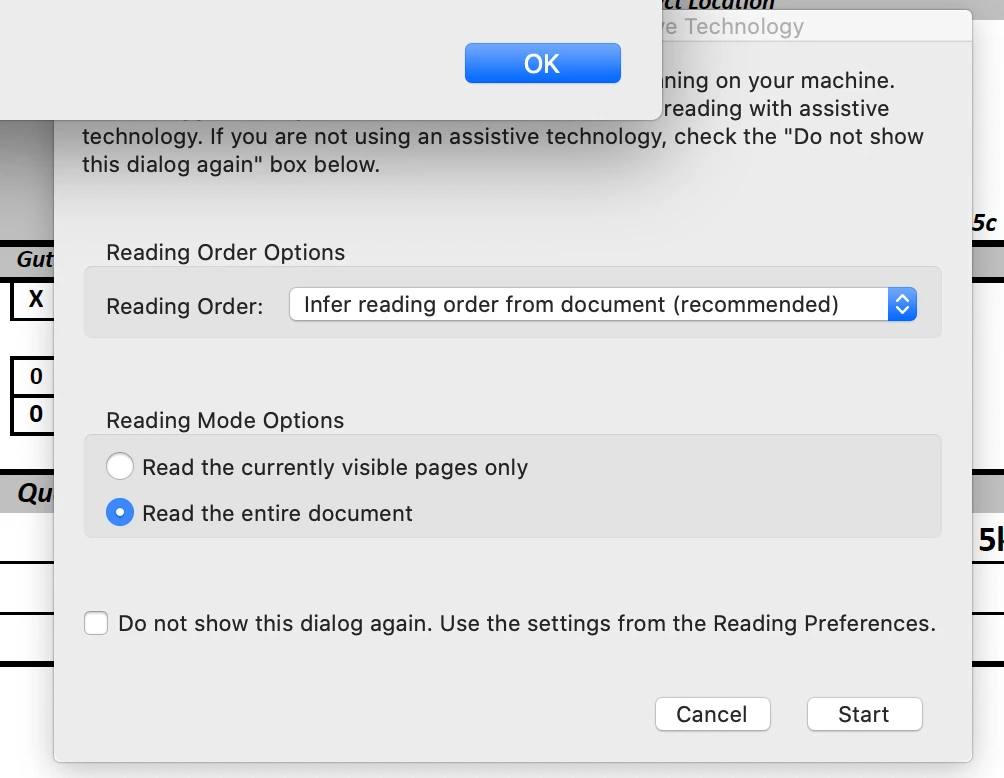
thanks. Updated.   Didnt get the RAISE crash (opened two PDFs successfully) .   Did get the attached window.   Dont know if it is an error, something necessary or just an annoyance.   Have been getting it for a while.

Do I need to reset some preference? Or just click START each time it comes up?


Adobe Employee
November 14, 2019

Hi,

This dialog is just shown for asking the user preference when some assistive technology is being used on the system. You can go with the recommended settings or by your choice. If you don't wish to see it again, just set the preference in the dialog and check the checkbox "Do not show this dialog.." and press OK. It won't be shown further for any pdf.


Please contact us if you still face any issue.


Thanks

Rachit

Adobe Employee
November 8, 2019

Hi,

Could you pls. let us know if you have on-screen keyboard opened up while viewing the pdfs?


Thanks,

Vinod

MBLRAuthor
Participating Frequently
November 8, 2019

Indeed I do

MBLRAuthor
Participating Frequently
November 9, 2019

So is that the reason? any workaround? any other compatibility issues with Catalina?