
Participant
April 9, 2025
Answered

Rand fehlt nach Ausdruck

  • April 9, 2025
  • 1 reply
  • 421 views

Hallo,


ich habe schon in einer Vielzahl von Foren gesucht, was alles erfolglos war bzw. waren dort beschriebene Lösungen für ältere Adobe Versionen und auf meine nicht mehr anwendbar.
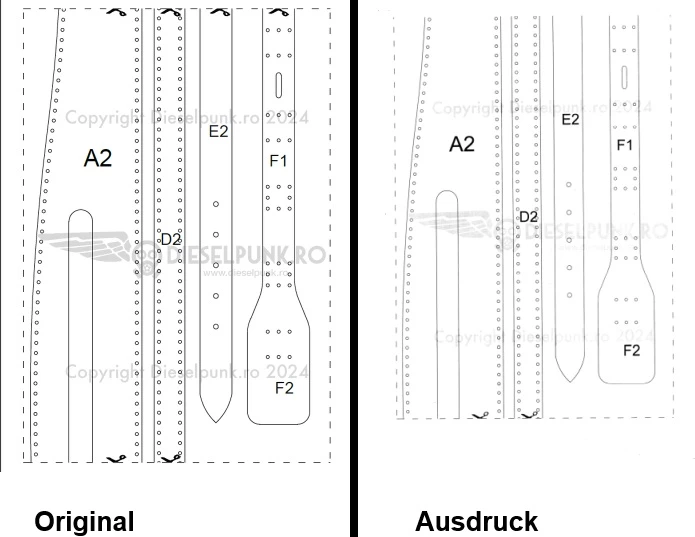


Beim Gedruckten wurde der untere Rand verschoben und es fehlt oben die Schnittkante. Das Dokument muss mit der Option "Tatsächliche Größe" gedruckt werden, weil sonst die Maße nicht mehr stimmen.

Mein Drucker heißt Pantum BP2309W .

Hat jemand eine Idee, woran das liegen könnte?
Correct answer R. Satzmann

Thank you for your quick reply.

As is often the case, the problem sits on the front of the PC.
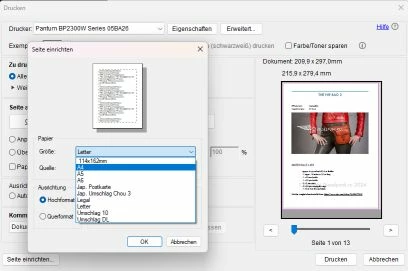
The tutorial video specifically points out that the size needs to be changed from "Letter" to "A4." I had overlooked this due to my advanced age. 😕😕


1 reply

Souvik Sadhu
Community Manager
Community Manager
April 9, 2025

Hi @R. Satzmann,


Hope you are doing well. Sorry for the trouble with printing files on Acrobat.


Have you checked if the page size is what you have in the original document? The screenshots look like the image goes outside the paper, resulting in borders missing.


Another method would be to print the file as an image. To do so:


  • Go to File > Print

  • Click Advanced

  • Check the box "Print as Image"

  • Click OK, then Print

More info about printing complex documents can be found here: https://adobe.ly/3FWtAEq.


Hope this helps.


Regards,
Souvik.

R. SatzmannAuthorCorrect answer
Participant
April 10, 2025

Thank you for your quick reply.

As is often the case, the problem sits on the front of the PC.
The tutorial video specifically points out that the size needs to be changed from "Letter" to "A4." I had overlooked this due to my advanced age. 😕😕


Souvik Sadhu
Community Manager
Community Manager
April 14, 2025

Hi @R. Satzmann ,


Happens with the best of us! 


Really glad that it worked for you.

Marking this as a correct answer for future users with the same issue to use this as a reference.


Regards,
Souvik.