
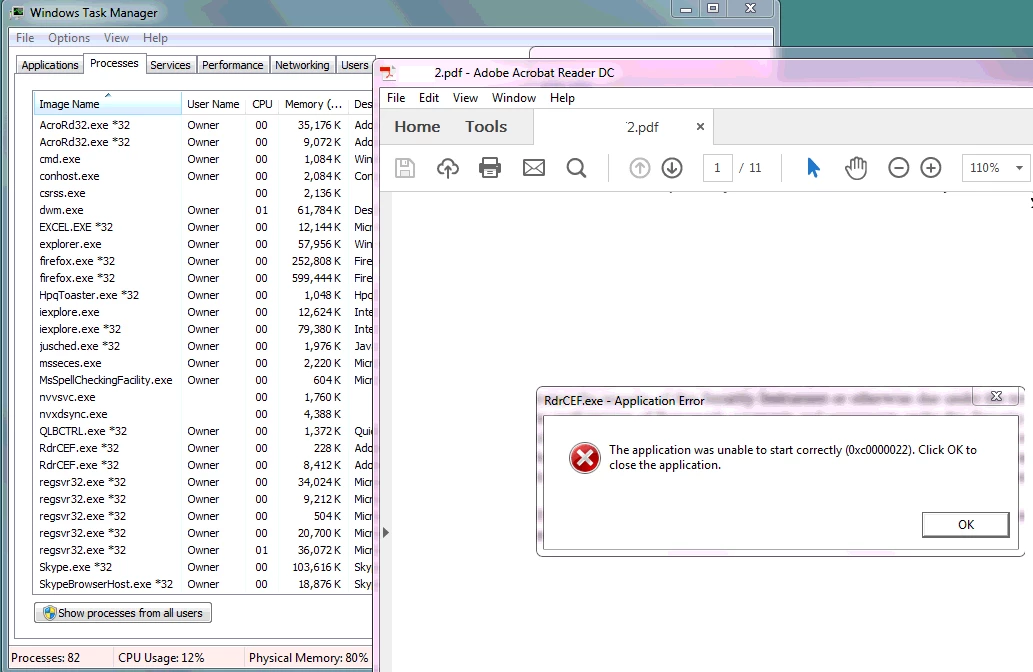
RdrCEF.exe -- Application Error
After latest update, I started getting following error after I open PDF files:
My system info:
Windows: Microsoft Windows 7 Professional, Version: 6.1.7601, Service pack: Service Pack 1
Adobe Reader: 2017 Release | Version 2017.009.20044
Latest entries from AdobeARM.log:
[2017-04-18 17:25:26:0175] Adobe ARM 1.824.21.4663 logging started.
[2017-04-18 17:25:26:0175] Command Line: /PRODUCT:Reader /VERSION:17.0 /MODE:3
[2017-04-18 17:25:26:0233] ProductCode: {AC76BA86-7AD7-1033-7B44-AC0F074E4100}
[2017-04-18 17:25:26:0233] ProductName: Adobe Acrobat Reader DC
[2017-04-18 17:25:26:0233] ProductVersion: 17.009.20044
[2017-04-18 17:25:26:0233] ProductUACPatching: enabled
[2017-04-18 17:25:26:0270] Using CommandLine preference AUTO_ALL
[2017-04-18 17:25:26:0270] Last check for updates not expired
[2017-04-18 17:25:26:0270] Error Code: 120300
[2017-04-18 17:25:26:0271] Using registered preference AUTO_ALL
[2017-04-18 17:25:26:0271] Last check for updates not expired
[2017-04-18 17:25:26:0271] Error Code: 120300
[2017-04-18 17:25:26:0473] ARM returns ERROR_SUCCESS
[2017-04-18 17:25:26:0473] Adobe ARM 1.824.21.4663 logging finished.
[2017-04-18 17:35:08:0037] Adobe ARM 1.824.21.4663 logging started.
[2017-04-18 17:35:08:0037] Command Line: /PRODUCT:Reader /VERSION:17.0 /MODE:1
[2017-04-18 17:35:08:0078] ProductCode: {AC76BA86-7AD7-1033-7B44-AC0F074E4100}
[2017-04-18 17:35:08:0078] ProductName: Adobe Acrobat Reader DC
[2017-04-18 17:35:08:0078] ProductVersion: 17.009.20044
[2017-04-18 17:35:08:0078] ProductUACPatching: enabled
[2017-04-18 17:35:08:0251] Using registered preference AUTO_ALL
[2017-04-18 17:35:09:0330] MDOV
[2017-04-18 17:35:09:0330] Error Code: 1615
[2017-04-18 17:35:09:0345] No files in Session, setting NO_UPDATES mode
[2017-04-18 17:35:12:0348] User exited
[2017-04-18 17:35:12:0579] ARM returns ERROR_SUCCESS
[2017-04-18 17:35:12:0579] Adobe ARM 1.824.21.4663 logging finished.
Thank you for your help.
Yaro
 AdChoices