
Answered
Re: Acrobat reader DC insists printing double sided
Did you ever solve this? I have exact same problem and it is driving me BATTY!

Did you ever solve this? I have exact same problem and it is driving me BATTY!
Hi Olenad,
As you do not find the "Print on both sides of paper" option in the Print window, click on Printer tab at the bottom of the same window.
Make sure that the "Two-Sided" box is unchecked and the drop-down option is selected as Off as shown in the screenshot below.
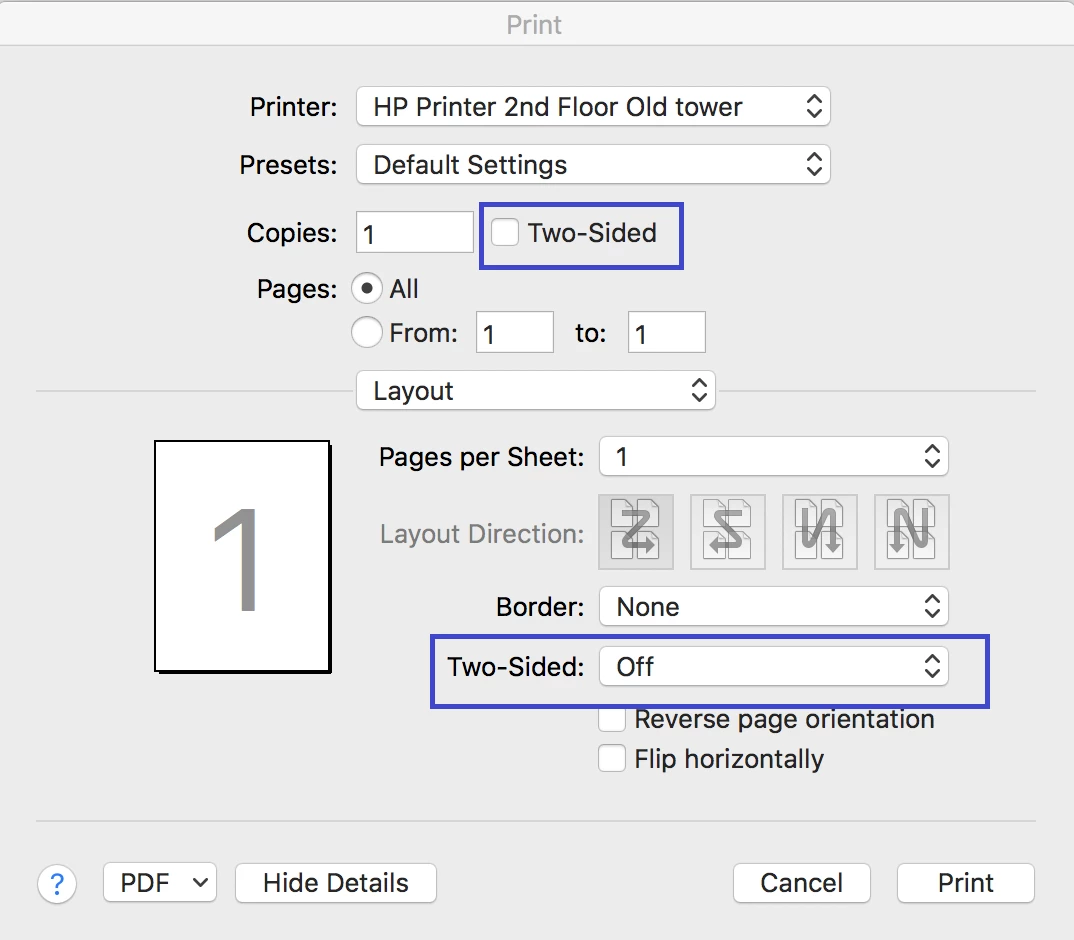
Check if that helps.
If you still experience the issue, please share the screenshot of the print window.
To add the screenshot here, please use the insert icon provided in the reply window as shown below:

Once you click on this icon, you get a small window.
Click on Insert Image and then browse the location where you have saved the screenshot file.
Select the file and click on Open > Insert Image.
Let us know if you need any help.
Regards,
Meenakshi
Already have an account? Login
No account yet? Create an account
Enter your E-mail address. We'll send you an e-mail with instructions to reset your password.


 AdChoices