

'Read mode' behaves similar to full screen mode (Windows)
Dear Adobe community sirs;
As far as I know, 'Read mode' shows the document only with title bar, menu bar and scroll bar.
But recently I found that my Reader DC for Windows shows like full screen mode always with 'Automatic' page layout. It means no title bar, no menu bar, no scroll bar.
My PC (desktop) has two monitor with asymmetric resolutions, main (left) is 1600x1200 and sub (right) is 1080x1920.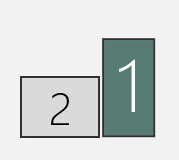
When I place Reader DC into the sub (right) monitor, document appears only in the lower common height (1200) and the rest is corrupted.
Disconnecting the sub monitor did not fix the issue. I tried Acrobat Creaner and re-installed but got same result. And same in newly created local account.
I gave up and installed Reader XI but it also behaves like DC however I can accept because it has only left side bar and it's less necessary to use 'Read mode'.
By the way I also use Acrobat X which works completely well including the mode.
In another laptop PC with only its single monitor, DC works normally.
Both PCs are almost same environment. Windows 10 x64 with all Windows Update.
Could you kindly tell me anything to do?
Best regards.


 AdChoices