
DelphinusIT
Known Participant
September 8, 2017
Answered

Reader DC Protected View not displaying filled in forms?

  • September 8, 2017
  • 1 reply
  • 4989 views

Pleasant day all! First time post, so I'll get right to it.

In Acrobat DC Reader, 2015 and 2017, when Protected View (iProtectedView http://www.adobe.com/devnet-docs/acrobatetk/tools/PrefRef/Windows/index.html ) is turned on for all files, a blank form when opened will show the form in read only mode.

However! - after enabling features, entering anything (even a single character into a single field) and saving, when the file is opened again there is a message "Please Wait... If this message is not eventually replaced by the proper contents of the document, your PDF viewer may not be able to display this type of document ...".
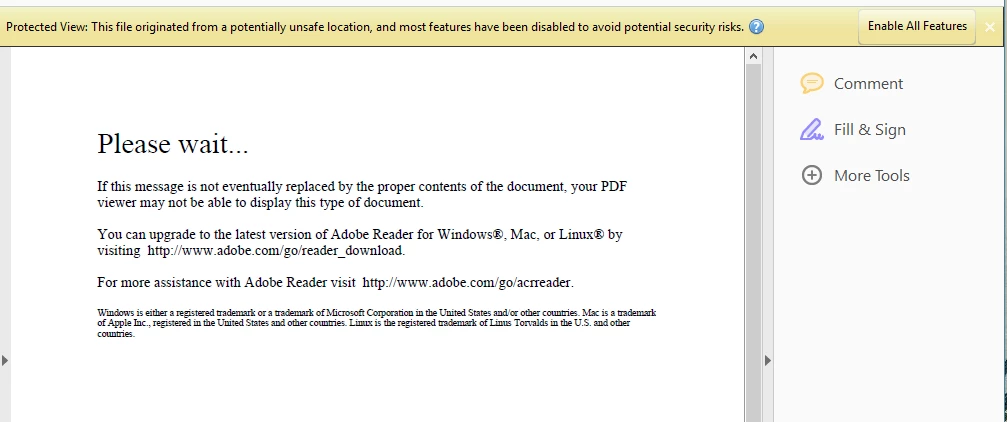
Clicking Enable all features allows the entire document to be viewed and puts the document into an interactive mode.

This also happens with forms that are provided partially or completely filled, not just forms created on the user's machine.

How can we keep protected view enabled for all files and allow users to read forms just by opening them without enabling all features?

Any help you can offer will be greatly appreciated.

This topic has been closed for replies.
Correct answer Kshakti

Hi JasonG876,

I'll try to debug the issue at my end with the sample files provided by you and come back to you with you next steps.

Thanks & REgards,

Shakti Keshri


Hi,

These are few PDF forms which renders the content from a server.

By design, due to security concerns rendering the content from a server is not allowed when the PDF is opened in Protected View .

That is why these PDFs are not displayed in protected view.

We'll look into the issue and decide if something can be done without compromising the security.

As of now , if you are accessing the files from a common location/domain , then you can trust that location/domain so that the PDFs are opened outside protected view.

Thanks,

Shakti K

1 reply

DelphinusIT
Known Participant
September 12, 2017

Medium quality news - this issue does not appear on every form! But it appears on enough forms found in the wild.

After checking around a bit, we found some examples of forms which work as expected, and some which do not

Below pdf forms work as expected, with protected view enabled for all files

https://www.gsa.gov/Forms/TrackForm/33102

https://www.gsa.gov/Forms/TrackForm/33101

https://navalforms.documentservices.dla.mil/formsDir/_DD_2875_MC__4571.pdf

Where:

1) blank forms appear as read only mode.

2) completed or filled-in forms which have been saved and reopened appear as read only mode.

Below pdf forms do not work as expected, with protected view enabled for all files

https://navalforms.documentservices.dla.mil/formsDir/_OPNAV_5239_14_7631.pdf

https://navalforms.documentservices.dla.mil/formsDir/_SECNAV_5512_1_11787.pdf

Where:

1) completed or filled-in forms which have been saved and reopened display the "Please wait..." error message and require enabling of all features before viewing content.

Is anyone able to suggest, or identify what is causing this?

DelphinusIT
Known Participant
September 13, 2017

Honestly, How does this work? No responses, not even from Adobe, not even a "Working as Intended" or "Cannot Reproduce".

The support links for Reader and Acrobat all led to "Community Forums". Is there some other way to get support? We received an approved "Adobe Reader and Runtime Software Distribution License Agreement".

Since all the posts appear to be moderated, will the moderator forward this on to someone who can tell me to seek support differently, or can give me any kind of response?

soumik011​ - I notice you are active in other threads, Can you provide some direction on steps I can take to maybe get communicating with someone?

soumik011
Adobe Employee
Adobe Employee
September 14, 2017

Hi JasonG876,

I am forwarding your issue to the concerned team. We will get back to you on this soon.

Regards

Soumik