


READER javascript to save as other text
Hi all;
I am trying to automate saving as a text file from Reader with a folder level javascript. doc.saveAs() does NOT work as there are no PDF converters in Reader (app.fromPDFConverters.length; returns as undefined, this also matches with looking in the save as menu item and seeing only pdf as the only save type option).
For my reader installation I can access the menu item in the below screenshot with the following method app.execMenuItem("ADBE:SaveAsAccText"). I have not been able to find in the SDK a more direct access method.
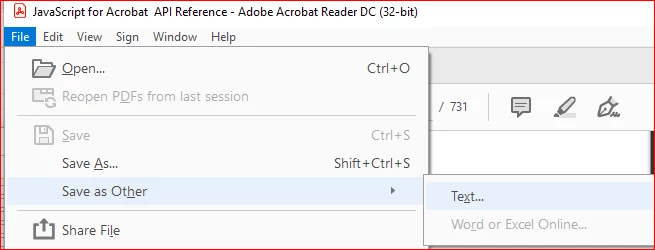
The problem is that this opens the save as explorer window and it does not sound like I can automate pressing the save button (also saving to another location).
So my ask is:
1) is there a setup I am missing that would get doc.saveAs() to save as a text file? If yes, can you point me to where?
2) is there an alternative to app.execMenuItem("ADBE:SaveAsAccText") that allows parameters?
3) can parameters (directory path) be passed to the app.execMenuItem("ADBE:SaveAsAccText") that would allow the save button click and new folder path? If yes, how?
Thanks in advance for your help.



 AdChoices