


Participant
November 20, 2020
Question

Reader v20 Hyperlinks Security Hyperlink warning check box NOT remembering "Remember this Action "

  • November 20, 2020
  • 1 reply
  • 457 views

Using a LibreOffice I created an .odt with hyperlinks to files to be located on an SD card.

I need the user an easy way to jump to supporting video, photo and PDFs located on that drive.  

I have exported the .odt as a PDF.   The only files that do not throw up the security warnings are the PDFs. Video and photos  get the pop ups:
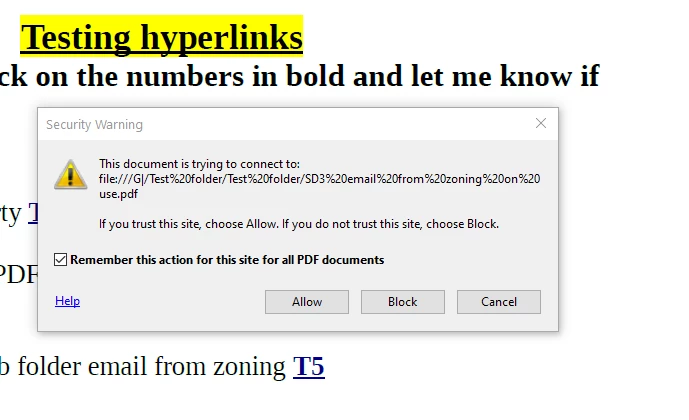
Reader DC v20 throws up the security warning and then annoyingly an other pop up after you click allow.

Why doesnt the check box work?

I can live with one pop up but not two.  I have  tried going to preferences and selecting Trust Manager  >change settings button> select  "allow pdfs to access all website"


I can click on the same link immediately after, withotu closing anythig and the same pop up occurs.


I understand that the Fille/// hyperlink  may be the reason for the prompts but do not think I can change it in Reader.  


How can we get the check box to work so they only get the warning ONE time?   


This topic has been closed for replies.

1 reply

ls_rbls
Community Expert
Community Expert
November 21, 2020

What happens if you disable Protected View or Protected Mode at startup?


In Edit--->>> Preferences--->>> Security Enhanced, have you enabled "Automatically Trust sites from my Windows OS security zones"?

Technical Generalist
Mak5CE1Author
Participant
November 21, 2020

Disabling "Protected Mode at Start up" eliminates the  second popup

The Security popup  shown in the  first post still appears and the check box does not do anything.

 I can click allow  , open the file   and go back to the same hyperlink without closing the file and it will still put the pop up . It is not remembering  this action .  The only thought would be the check box is not for all types of links since it states  "Remember this action for this site..."   I am not linking to a web url so I wonder if that is why?


"Autromatically Trust sites on my Windows OS security zones" was already selected