
zman6824
Participant
February 6, 2018
Answered

Reduce cursor size in Adobe Reader DC and X Pro

  • February 6, 2018
  • 14 replies
  • 72849 views

Hi there,

I am currently using Adobe reader DC and X pro.

For some reason when i go to select text in a PDF (single line) the cursor size is too big and selects paragraphs rather than a single line.  How do i adjust the cursor size.  See attached screen capture for more details (cursor size highlighted in red).  I am running this on a Windows 10 PC.  Thanks!
Correct answer Efrain2407285271zs

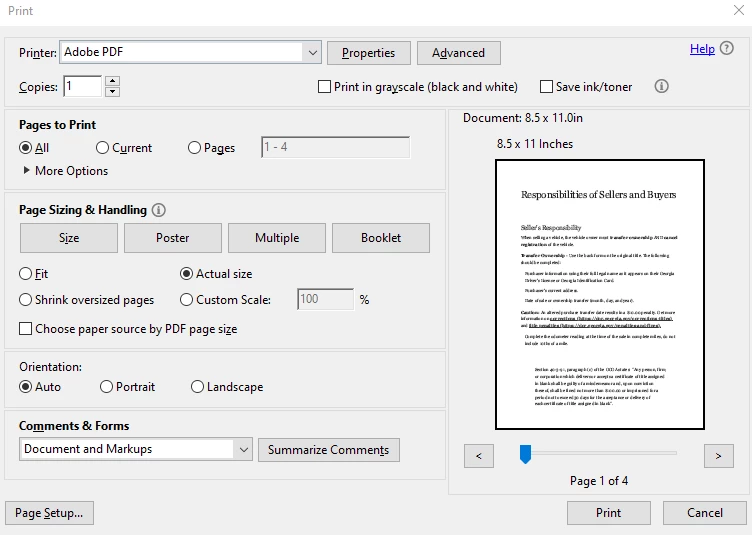
Go to Print Settings where you choose the Printer, uncheck Shrink oversized pages and check actual size.

It workeed for me. Hope it helps


14 replies

patsy_o_neal
Participant
April 26, 2018

I have Adobe Reader XI and when I Add Text the Cursor is extremely (at least an inch) long and the type is at the bottom of the cursor in the wrong position from where I placed the cursor to begin with.  Also the line spacing is extremely far apart instead of a normal space. See below the size of the Cursor at the end of the sentence and the spacing between the lines.  patsy o'neal

Adorobat
Community Manager
Community Manager
May 24, 2018

Hi Patsy,

Would it be possible if you can share the pdf file you are working with to replicate the issue at our end? To share the file here in the forums, please refer to the steps given here: How to share a file using Adobe Document Cloud

Also, could you try adding text to another pdf file and check if this behavior continues.

Thanks,

Shivam

Participant
March 31, 2018

I noticed that if you have full version of Acrobat, you can print the document to another PDF file (using Ctrl + P & Adobe PDF printer), save it as a different filename, and this removes the oversize cursor. A workaround. I experience this problem too from time to time.

Sincerely,

Michael Sandel

Participant
April 12, 2019

This workaround definitely helped! Thanks Michael!

Participating Frequently
January 28, 2020

This is a work around but has anyone founda fix?? I have tried unistalling & reinstalling the printer & ddrivers without success.

Participant
February 21, 2018

I have the same issue with Acrobat Pro XI running on Windows 10

The display scaling solution suggested does not fix the issue, and screws up everything else.

try67
Community Expert
Community Expert
February 21, 2018

This will happen if the underlying text in the PDF is very large. There's nothing that can be done about it using the free Reader.

You should report this issue to the author of the file.

Participant
February 21, 2018

Thank you for your prompt reply and suggesting what the cause might be -- but I am not using the free reader, but a full version of Acrobat Pro XI. So is there a font fix that is possible?

Adorobat
Community Manager
Community Manager
February 9, 2018

Hi Zman,

Please try following troubleshooting steps:

1- Right click on start menu > select settings.

2- Click 'system' > Display.

3- Under scale and layout > custom scaling.

4- Enter a custom scaling size to 124%

5- Click Apply and check.

Let us know if you need any help.

Shivam

Participant
January 17, 2023

This did not work. 😕😕