Participant
June 4, 2024
Answered

Remplissage automatique

  • June 4, 2024
  • 2 replies
  • 1369 views

Bonjour,

J'utilise Adobe reader (version gratuit). J'aimerais savoir si on peut enlever les suggestions de texte.

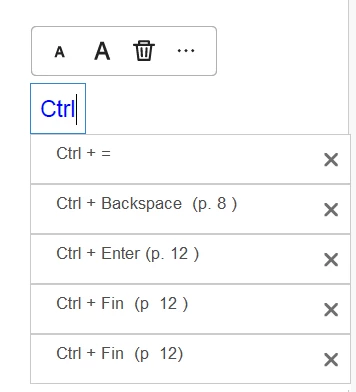
J'explique. Quand je veux écrire du texte, sous la boite texte j'ai souvent une liste qui apparait en dessous avec des choix de texte. Je sais que je peux cliquer sur le X mais ça revien.


Merci pour votre aide

Amélie C
 

This topic has been closed for replies.
Correct answer Bernd Alheit

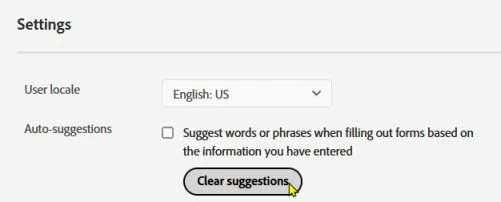
In a browser open www.acrobat.com and sign in with your Adobe Id. At the settings of your account you can disable it:

2 replies

Bernd Alheit
Community Expert
Bernd AlheitCommunity ExpertCorrect answer
Community Expert
June 5, 2024

In a browser open www.acrobat.com and sign in with your Adobe Id. At the settings of your account you can disable it:

Participant
June 5, 2024

Bonjour Bernd Alheit,   

Ça fonctionne, je vous remerci infiniment


Amélie C

try67
Community Expert
Community Expert
June 4, 2024

Try this: Go to the application's Preferences (via the Menu button or under the Edit menu), select Forms and set Auto-Complete to Off.

Participant
June 4, 2024

Bonjour Try67,

C'est ce que j'ai fais, mais ça ne fonctione pas. J'ai toujours une liste déroulante en dessous de la boite texte