This topic is closed to new replies. Start a new post to keep the conversation going.
AkanchhaS8194121
AkanchhaS8194121Correct answer
Legend
Jun 5, 2023 8:59 PM UTC

Hi @PositiveEnergy 


Thanks for sharing your findings.

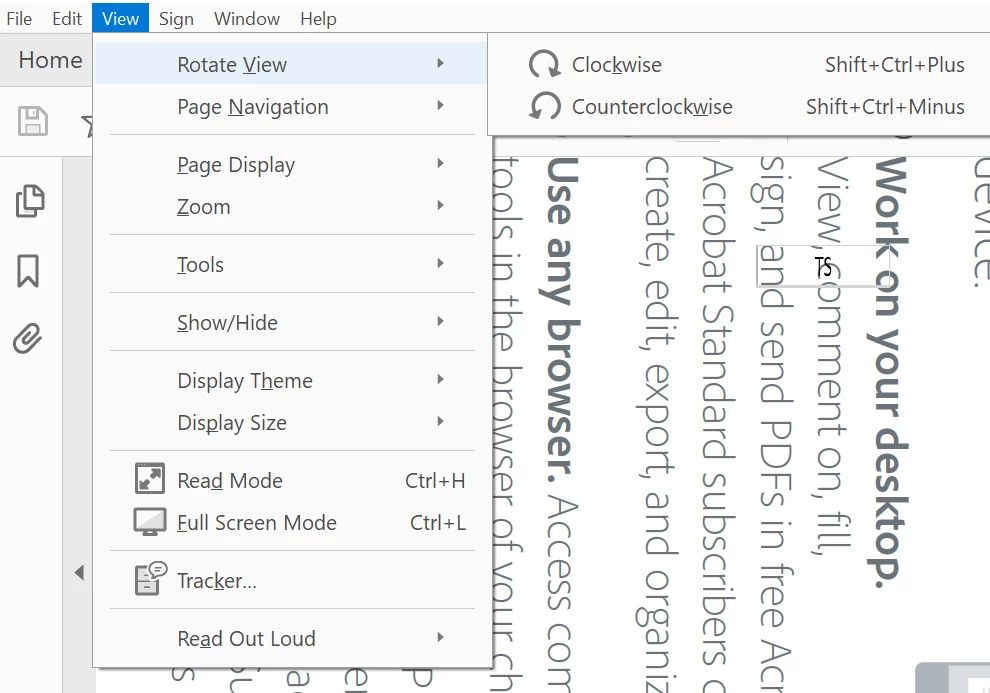
However, the keyboard shortcuts you are referring to in this video are for the View rotation, not the file/page rotation of a document. 

Document view can be rotated under Reader>View>Rotate View

Once it reopens, it will revert to its original view. Rotation is still part of Acrobat Pro (paid service)


Thanks,

Akanchha 


2 replies

JR Boulay
Community Expert
Community Expert
Jun 6, 2023 8:52 AM UTC

[MOVED TO THE ACROBAT READER DISCUSSIONS]

Translate
Acrobate du PDF, InDesigner et Photoshopographe
AkanchhaS8194121
AkanchhaS8194121Correct answer
Legend
Jun 5, 2023 8:59 PM UTC

Hi @PositiveEnergy 


Thanks for sharing your findings.

However, the keyboard shortcuts you are referring to in this video are for the View rotation, not the file/page rotation of a document. 

Document view can be rotated under Reader>View>Rotate View

Once it reopens, it will revert to its original view. Rotation is still part of Acrobat Pro (paid service)


Thanks,

Akanchha 


Translate