
Participant
December 3, 2020
Question

SAP users are unable to print PDF attachments through Reader .20066

  • December 3, 2020
  • 1 reply
  • 4803 views

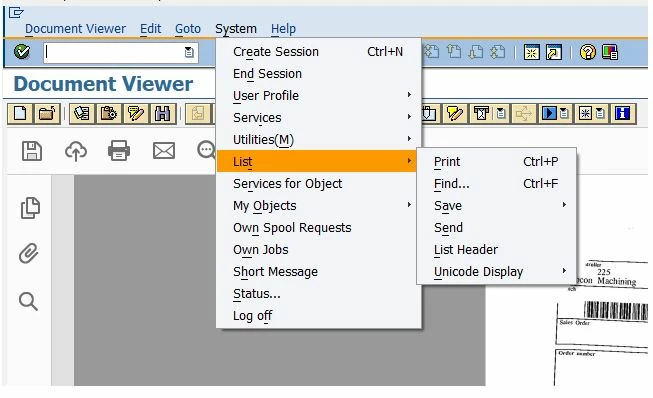
Our SAP users are trying to print PDF attachments that have been scanned in but the print button is greyed out.  They have Adobe Reader .20066 installed which is the latest version.

 

If they print via System -> List -> Print they are able to print, but only a blank page is printed.
 

This topic has been closed for replies.

1 reply

Participant
December 8, 2020

Adobe Customer Support came back to me with this suggestion - https://helpx.adobe.com/in/acrobat/kb/troubleshoot-pdf-printing-acrobat-reader.html

Unfortunately this didn't help as I have already done a lot of troubleshooting and believe it is a bug in this version of Adobe Reader.  This was my reply:


Hi,
Thank you for the link to the article for troubleshooting Adobe printing, however I have already troubleshooted this issue and these are the symptoms we are dealing with:
On all affected PCs, we can print a PDF normally if opened in Adobe Reader first

  1. The issue is only happening with PDF invoices that are scanned in to SAP, then opened with the Adobe frame Document Viewer within SAP
  2. If the user saves the PDF first, they can print it because printing from Adobe Reader works
  3. What they can’t do is print from the Adobe frame within SAP, but they used to be able to do this before Adobe Reader was updated to .20066
  4. This is happening with multiple users on multiple machines with any PDF attachment
  5. If we uninstall the latest Adobe Reader and install a previous version it works again

With all these facts, I have come to the conclusion that this is a bug in the latest version.
Please advise as this is slowing down production


I haven't had a response to this from Adobe.  Can someone please confirm if this is a bug and whether a fix is imminent please?

Participant
September 25, 2022

Sir you mentioned in your comment that you have installed previos version and issue got fixed. Please share the Adobe Reader version that you can able to print in Adobe Frame within SAP.