
Participant
December 18, 2023
Question

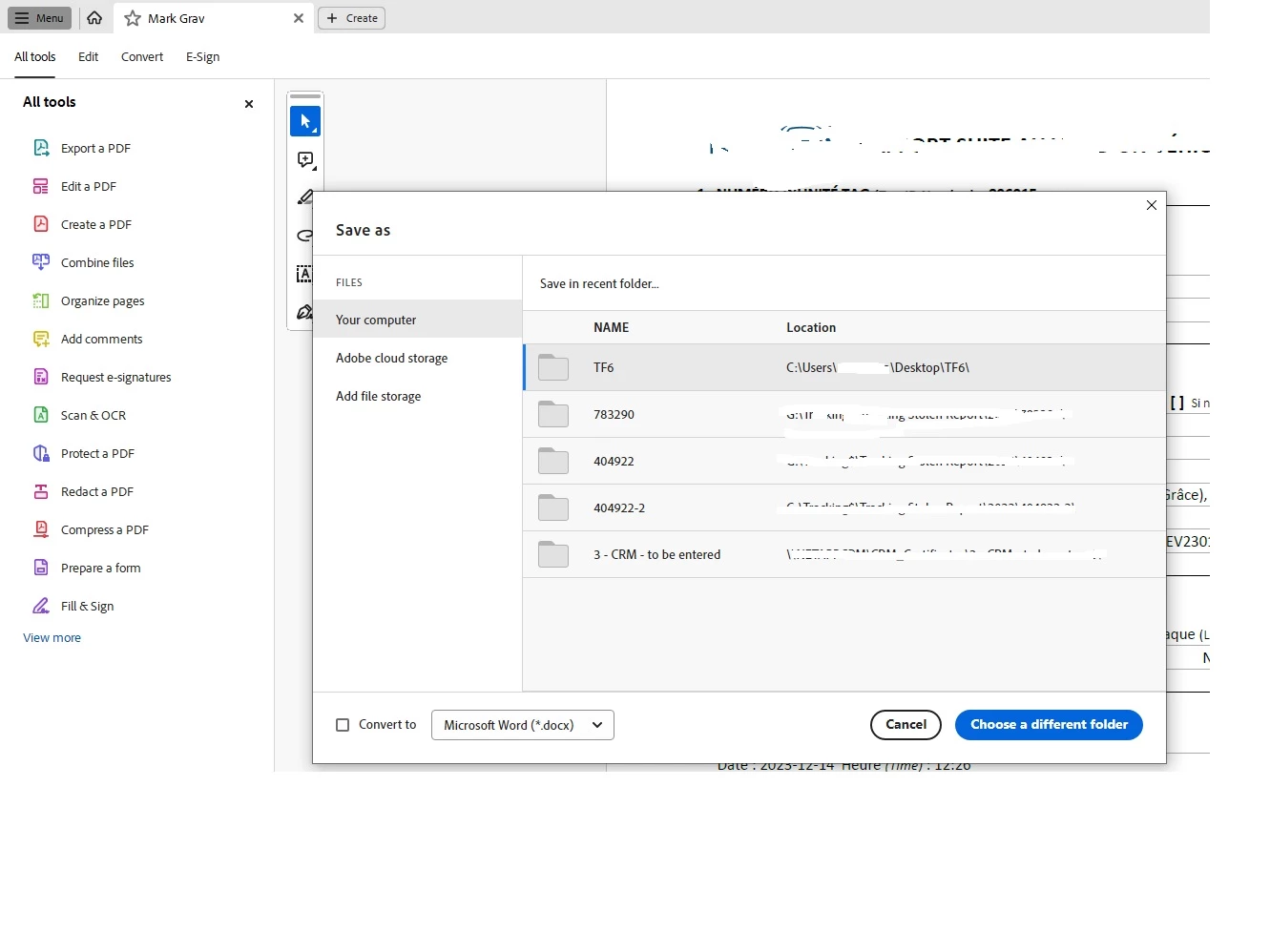
Save as recent not allowing me to click

  • December 18, 2023
  • 1 reply
  • 478 views

I'm using Acrobat Reader v. 2023.008.20421 on a Win10Pro  machine, when choosing  Menu, Save As.. it's showing me the recent files on my computers but when I choose the location I want, nothings happening unless I click on Choose a different folder.


[This question was moved from the Acrobat Pro to the Reader forum.]
 

1 reply

Participating Frequently
March 25, 2024

I'm having the same problem. I have Mac OS Sonoma 14.4, Acrobat Pro 2024.001.20615 but see that others using Windows are having the same problem.

I tried uninstalling Acrobat Pro and reinstalling, but it didn't help. If I save the file to the desktop or Documents folder, it works. But if I save it to my folders which are not under Documents, it doesn't work. Nothing shows in the Recent list except older files, and when I try to mark it as a Favorite, I get a dialog box that says it must be saved first. But, it still doesn't work unless I save it to the Desktop or Documents folder. This has never been a problem before.

Adobe, please fix this bug.

Participant
July 11, 2024

Having the same issue. Following.