
Participant
May 26, 2025
Answered

Screen Reader Compatibility Issues with Adobe Reader After Latest Update

  • May 26, 2025
  • 2 replies
  • 1738 views

We’ve received reports from some users utilizing screen reader software such as JAWS and NVDA that they are experiencing issues with PDF accessibility in Adobe Reader following the most recent update.

25.001.2047x Optional update, Apr 28, 2025

Specifically, the screen readers are no longer functioning as expected when reading PDF documents.

Is anyone else encountering similar problems? Is Adobe aware of this issue or has provided any guidance or updates?
Correct answer Rahul29827631i2x0

Hi Rahul,

Thanks for reaching out to us.

We’re looking into the issue, but could you please tell us exactly what happens when you try to open the document using a screen reader?

To help us understand the problem better, please share the following details:
1. Which operating system (OS) are you using?

2. Does the issue happen with just one file or with all files?

3. What language or region settings (locale) are you using?

4. Are you using tagged or untagged document?
Thanks again for bringing this to our attention.

Regards,

Ayush Jain


Good day,

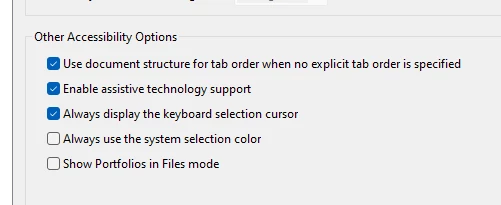
We have identified the root cause of the issue. It appears that our default accessibility settings were altered during the most recent Adobe update. When the Accessibility Setup Wizard appeared post-update, the changes went unnoticed by our users.

We have since restored the original settings and both NVDA and JAWS are now functioning as expected.

2 replies

Participant
May 30, 2025

Hi Rahul29827631i2x0,

Do you have any updates on this issue?
We are experincing the same after the optional update was pushed into our PCs.

NVDA & JAWS are not working as they were with the same documents that were already accessible.

We have win11 23H2 on our PCs. 

Participant
June 30, 2025

Same thing is happening here with a user as well. they are using JAWS2024 and Acrobat Pro 25.001.20531

Meenakshi Negi
Community Manager
Community Manager
July 3, 2025

Hi lisa_5669,


Thank you for reaching out.


Please confirm if you have checked the settings as suggested above. If not, please check and see if the issue still occurs.


Feel free to let us know if you need any help.


Thanks,

Meenakshi

Community Manager
May 26, 2025

Hi @Rahul29827631i2x0


Sorry for the troubled experience, and thanks for reaching out. 

More details about the issue would be appreciated. Like: 

- What was working earlier and what is not. 

- Has anything changed apart from the Reader update? It has been almost a month since the update went out. 

- You can try to uninstall Reader: https://get.adobe.com/uk/reader/, click on the small text "More download options" above the Download button. This will help download the previous full version without the optional update. 

- Reproduce the issue.

- If this is confirmed related to the optional update, help us with the file and details of the issue, so it will be easier for the product team to narrow download the cause and directly look into the reported issue.


~Tariq

Participant
May 26, 2025

Hi Tariq,

In our department, software updates are not applied immediately and Adobe Reader was only updated last week.

Since the update, two users have reported accessibility issues:

  • One user, who relies on JAWS was previously able to read a specific PDF document using Adobe Reader. After the update, the same document is no longer accessible via JAWS.
  • Another user, who uses NVDA was successfully reading PDFs last week. As of today, NVDA is no longer reading PDFs in Adobe Reader.

I'll request a rollback to the previous version of Adobe Reader within our department to determine whether this resolves the issue.

Thanks.

Adobe Employee
May 27, 2025

Hi Rahul,

Thanks for reaching out to us.

We’re looking into the issue, but could you please tell us exactly what happens when you try to open the document using a screen reader?

To help us understand the problem better, please share the following details:
1. Which operating system (OS) are you using?

2. Does the issue happen with just one file or with all files?

3. What language or region settings (locale) are you using?

4. Are you using tagged or untagged document?
Thanks again for bringing this to our attention.

Regards,

Ayush Jain