

JR Boulay
Community Expert
Community Expert
September 21, 2021
Question

Search bug

  • September 21, 2021
  • 9 replies
  • 574 views

Hello


Acrobat Reader 2021.007.20091

Windows 10 professionnel 19043.1237

(Both in French version)


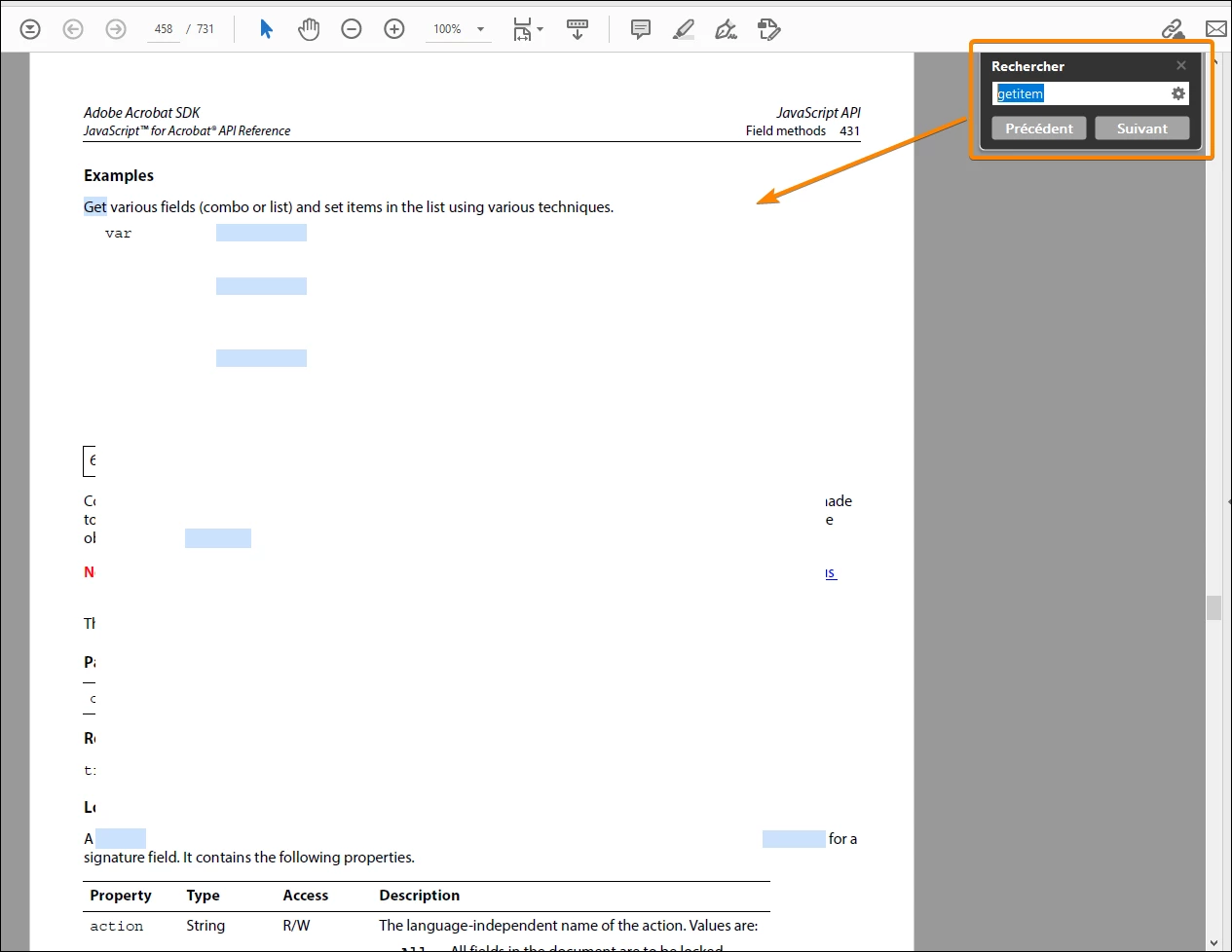
Every time I use the search function with Acrobat Reader this is what I get, a blank page with blue highlights. I have to change the zoom factor to restore a normal display, and it becomes really painful.


This bug has been around for several months and it is time to correct it.

Thank you.
 

This topic is closed to new replies. Start a new post to keep the conversation going.

9 replies

JR Boulay
Community Expert
JR BoulayCommunity ExpertAuthor
Community Expert
December 12, 2021

It is a bug which affects Adobe Acrobat when reading a document produced by Adobe.

Still no solution in sight?

Acrobate du PDF, InDesigner et Photoshopographe
JR Boulay
Community Expert
JR BoulayCommunity ExpertAuthor
Community Expert
December 7, 2021

up !

Acrobate du PDF, InDesigner et Photoshopographe
JR Boulay
Community Expert
JR BoulayCommunity ExpertAuthor
Community Expert
November 23, 2021

It wasn't easy because it's a random bug but I got it, now you can watch the movie:


Acrobate du PDF, InDesigner et Photoshopographe
JR Boulay
Community Expert
JR BoulayCommunity ExpertAuthor
Community Expert
October 30, 2021

Sorry, I have not been notified of your response .

This bug is still alive:


Acrobate du PDF, InDesigner et Photoshopographe
JR Boulay
Community Expert
JR BoulayCommunity ExpertAuthor
Community Expert
October 1, 2021

??

Acrobate du PDF, InDesigner et Photoshopographe
Meenakshi_Negi
Legend
October 1, 2021

Hi JR Boulay,


Sorry for the delay in response.


We have tried to replicate the behaviour at our end on two machines using the same document and it works fine.

Could you please try updating the application to the latest version released on Sep 29? Then check if you expeirence the same behaviour.


Let us know how it goes.


Thanks,

Meenakshi

JR Boulay
Community Expert
JR BoulayCommunity ExpertAuthor
Community Expert
September 28, 2021

?

Acrobate du PDF, InDesigner et Photoshopographe
JR Boulay
Community Expert
JR BoulayCommunity ExpertAuthor
Community Expert
September 22, 2021

A video would show nothing more than typing in the search box, clicking the Next button, and displaying what we see above.


On the other hand, all things considered, this bug happens as well on my old Mac as on my new PC and also happened on other computers that I have had.


But that only happens with this document, so that makes him an ideal suspect.


This document is the JavaScript for Acrobat API Reference

Available here: https://opensource.adobe.com/dc-acrobat-sdk-docs/acrobatsdk/documentation.html


Thank you

Acrobate du PDF, InDesigner et Photoshopographe
Meenakshi_Negi
Legend
September 21, 2021

Hi JR Boulay,


Hope you are doing well and sorry for the trouble.


As you have mentioned, the issue has been around for several months. Would you mind sharing more details on this?

We did try to reproduct it in house, however, it works fine at our end.


It would be very helpful if you can share a video along with the sample PDF on which the issue can be reproduced. We will share these details with the team to further inestigate this issue.


Thanks,

Meenakshi