
Participant
January 11, 2024
Answered

Send PDF does'nt work anymore

  • January 11, 2024
  • 1 reply
  • 674 views

Hello


We have a Terminal Server 2022 (21H2) with Adobe Acrobeat Reader.

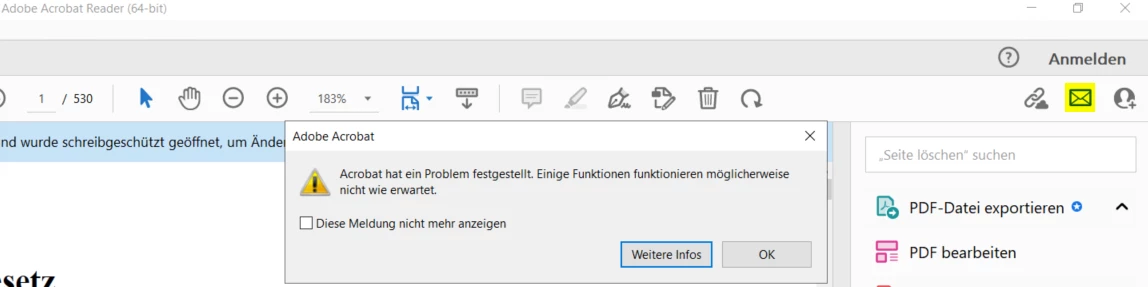
Since today Sending a PDF by eMail out of the Reader does'nt work anymore.

(Failure: Acrobat has encountered a problem. Some Features may no work as expected.)


What we have tried to solve:

https://helpx.adobe.com/de/acrobat/kb/acrocef-rdrcef-errors.html (close all Tasks, Exception in Symantec AntiVirus, Repair, Uninstall/Install)

Restart Server

Update to https://www.adobe.com/devnet-docs/acrobatetk/tools/ReleaseNotesDC/continuous/dccontinuousdec2023qfe.html#dccontinuousdectwentytwentythreeqfe


What can we do else?


Regards

Sven

This topic has been closed for replies.
Correct answer AnandSri

Hi @slug-tiag 


I hope you are doing well, and we're sorry for the trouble.


We want to bring to your attention a known issue that has surfaced with the Windows Server 2022 update (KB5034129). Microsoft is aware of this issue and plans to address it in an upcoming release for Windows Server 2022.


In the meantime, please refer to the steps outlined in the release notes for Windows Server 2022 (KB5034129) to resolve this issue until the operating system update with the fix becomes available. The affected keys are AcroCEF and RdrCEF.


If you are not using Windows Server 2022, kindly provide us with additional details so we can assist you further.


Thanks,

Anand Sri.

1 reply

AnandSri
Community Manager
AnandSriCommunity ManagerCorrect answer
Community Manager
February 2, 2024

Hi @slug-tiag 


I hope you are doing well, and we're sorry for the trouble.


We want to bring to your attention a known issue that has surfaced with the Windows Server 2022 update (KB5034129). Microsoft is aware of this issue and plans to address it in an upcoming release for Windows Server 2022.


In the meantime, please refer to the steps outlined in the release notes for Windows Server 2022 (KB5034129) to resolve this issue until the operating system update with the fix becomes available. The affected keys are AcroCEF and RdrCEF.


If you are not using Windows Server 2022, kindly provide us with additional details so we can assist you further.


Thanks,

Anand Sri.