
Participant
November 8, 2022
Question

Setup hat eine funktionsreichere Produktversion auf Ihrem System gefunden. Setup wir jetzt beendet

  • November 8, 2022
  • 1 reply
  • 4971 views

Hallo an alle,

ich versuche gerade von 22.002.20191 auf  22.003.20263 upzudaten, leider erfolglos.
Das ganze versuche ich mit einem Batch-Script:

"%~dp0AcroRdrDC2200320263_de_DE.exe" /sAll /rs /msi EULA_ACCEPT=YES DISABLEDESKTOPSHORTCUT=1

Da die Installation nicht durchgeführt wird, habe ich es manuell per Klick installiert und bekomme folgende meldung:
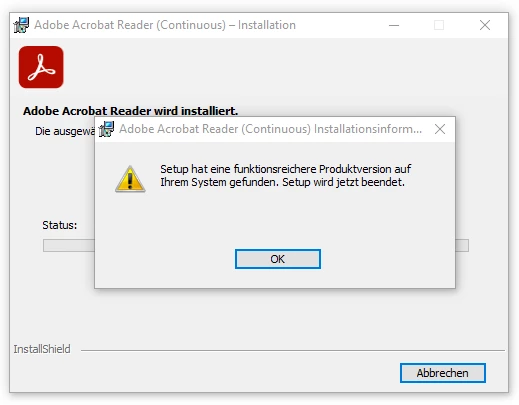
Ich verstehe die Meldung nicht ganz. Warum kann ich die Version jetzt nicht Installieren?
Das ganze soll dann per SCCM ausgerollt werden. Händisch installieren kommt also nicht in Frage 🙂

This topic has been closed for replies.

1 reply

Souvik Sadhu
Community Manager
Community Manager
December 1, 2022

Hi @gpdw,


Hope you are doing well. Sorry for your experience with Acrobat Reader. 


You might want to check the below link for more information on deployment: 64-bit Unified App Installer — Deployment Planning and Configuration.


Hope this helps.


-Souvik

Participant
March 11, 2023

I have exactly the same prome as described by gpdw.

The link  64-bit Unified App Installer — Deployment Planning and Configuration did not really help as I could not identify an install parameter which ensures installation over any existing Adobe Reader installation.

Many thanks for help - Michael


Souvik Sadhu
Community Manager
Community Manager
March 13, 2023

Hi @Michael28827940wmoj,


Have you tried installing the base version and then install the patch update that you want to install on the system?


-Souvik