

sandrae58507501
Participant
March 5, 2019
Answered

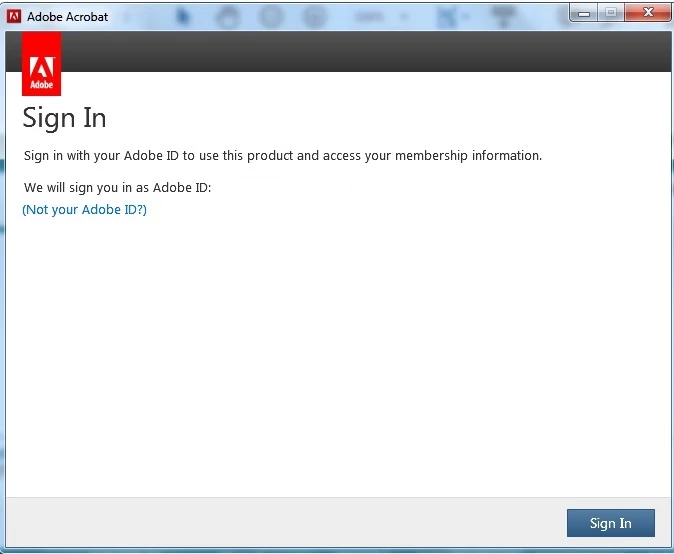
Sign in popup

  • March 5, 2019
  • 2 replies
  • 3512 views

Every time I open a PDF, the pictured popup shows up in middle of the pdf. How do I stop this permanently. [Windows 7 with Acrobat Reader.] Thank you.

    This topic is closed to new replies. Start a new post to keep the conversation going.
    Correct answer AnandSri

    Hello Sandrae,

    I am sorry for the trouble you had with Adobe Reader. What is the current verison of Adobe Reader installed? To identify, please refer to 

    Identify the product and its version for Acrobat and Reader DC

    Please reboot the machine once and launch Adobe Reader and check for any pending updates from help>check for updates, reboot the machine again and check.

    Try repairing the Adobe Reader installation files from help>repair installation, reboot the machine and check.

    Try signing in on Adobe Document Cloud with the Adobe ID and password you are using in Adobe Reader and see if you get any error message.

    For testing purpose, connect the machine to a different network environment like a guest wireless network or a mobile hotspot and sign in Adobe Reader application.

    Let us know how it goes and share your observation.

    Thanks,

    Anand Sri.

    2 replies

    AnandSri
    AnandSriCorrect answer
    Legend
    March 5, 2019

    Hello Sandrae,

    I am sorry for the trouble you had with Adobe Reader. What is the current verison of Adobe Reader installed? To identify, please refer to 

    Identify the product and its version for Acrobat and Reader DC

    Please reboot the machine once and launch Adobe Reader and check for any pending updates from help>check for updates, reboot the machine again and check.

    Try repairing the Adobe Reader installation files from help>repair installation, reboot the machine and check.

    Try signing in on Adobe Document Cloud with the Adobe ID and password you are using in Adobe Reader and see if you get any error message.

    For testing purpose, connect the machine to a different network environment like a guest wireless network or a mobile hotspot and sign in Adobe Reader application.

    Let us know how it goes and share your observation.

    Thanks,

    Anand Sri.

    Participant
    September 9, 2021

    This isn't an answer. How do we get this annoying pop up to go away?
