rasmus-tt
Participant
March 24, 2026
Question

SIgnature validation bug in Adobe Reader

  • March 24, 2026
  • 1 reply
  • 15 views

Adobe  Reader does not validate isomorphic signature files consistently.

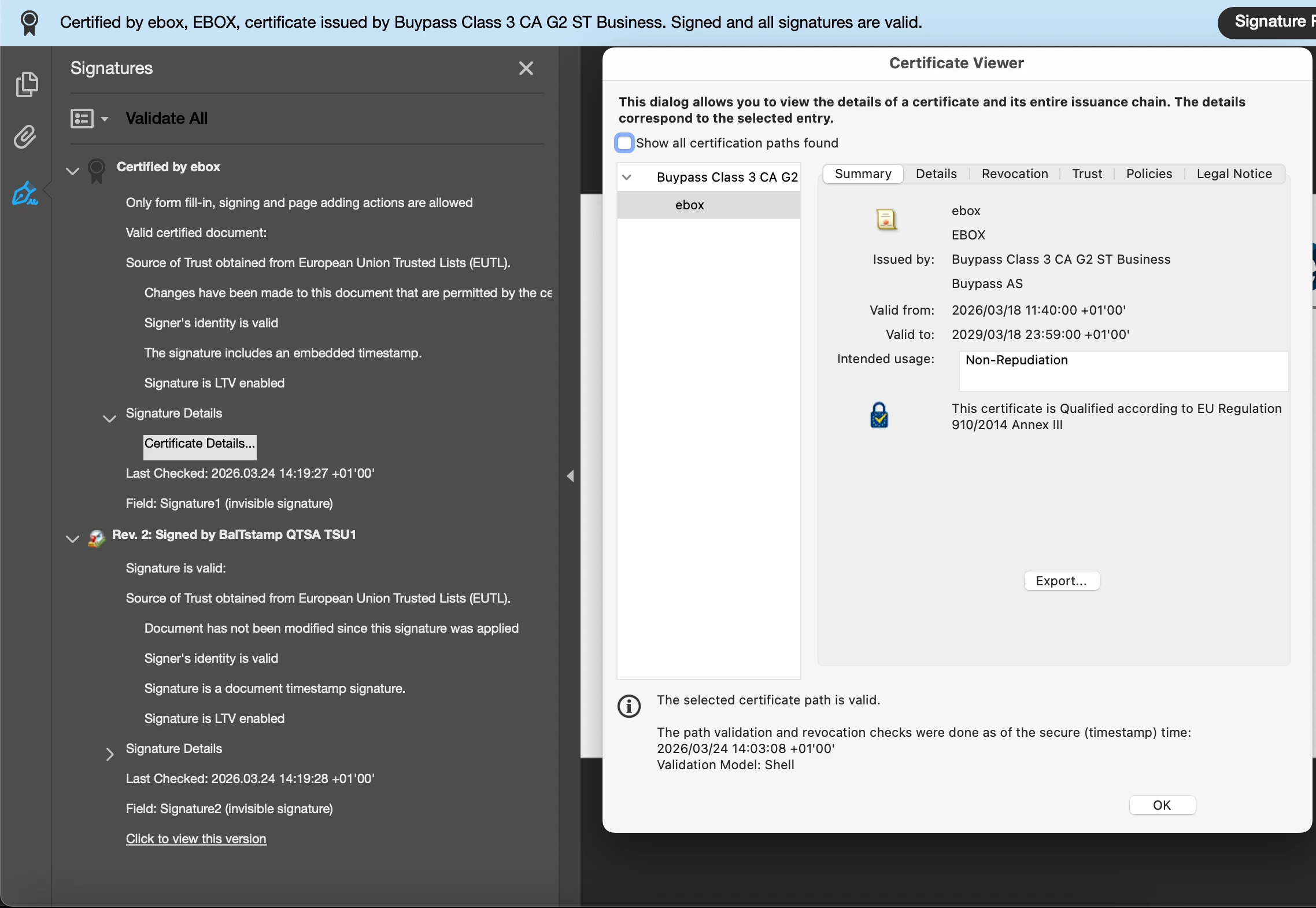
We have 2 files signed with EUTL trusted CA and LTA enabled with EUTL TSA (Timestamp).

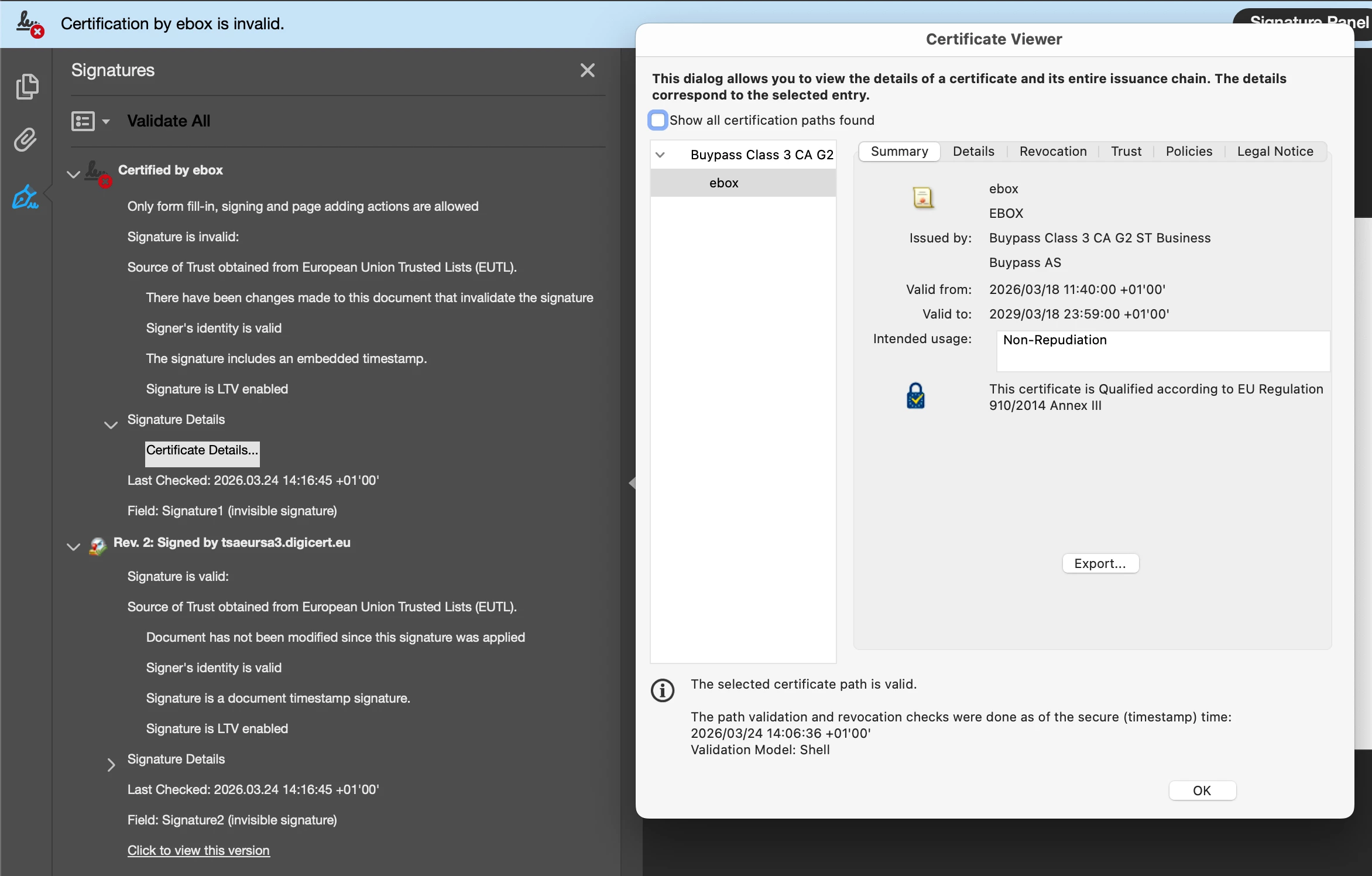
They are both valid according to the Esig DSS validation service, but Adobe Reader (latest and earlier versions) flags one as NOT valid and the other as valid.

We have made object-level analysis and no structural differences are found.

The one regarded as invalid is based on an editable form that was “frozen” to non-editable before signature. This seems significant.


The files were both produced using the latest version of Esig DSS code package, release 6.4. - but same error occurs when we sign the form file with older DSS version.


Screenshots of the example files.


    1 reply

    rasmus-tt
    rasmus-ttAuthor
    Participant
    March 24, 2026

    We have investigated more and can now pin down the problem:

    Adobe doesn’t like signed files that contain embedded PDF with form fields.

    The “invalid” file contains a PDF 1.5, the validated one has a PDF 1.7, both with form fields.

    Perhaps something with how the form fields are presented.
    Possibly the embedded 1.5 file  is not strictly correct PDF format?

    You can extract the embedded files from the signed files attached.


    Still the signatures are correct and should be valid; the embedded file has not been changed, and they are both valid according to Esig/DSS:

    https://ec.europa.eu/digital-building-blocks/DSS/webapp-demo/validation


    So I still regard this as a validation bug in Adobe Reader DC, but easy for us to avoid, just “freeze” form files before creating the signature. 


    Regards,

        /rasmus

    Amal.
    Legend
    March 25, 2026

    Hi there,
     

    Hope you are doing well and thank you for reaching out and for sharing such a detailed analysis of the issue and we are sorry for the trouble you are experiencing.
     

    It sound like the behavior may be related to how Adobe Reader handles PDFs with embedded files and form fields—especially when there are differences in PDF versions (1.5 vs 1.7) or when forms are “frozen” before signing. These structural elements can sometimes affect how the signature validation engine interprets the document, even if the signature itself is technically valid.
     

    As you have already tried narrowing it down to embedded PDFs with form fields. While Adobe Reader aims to follow strict validation rules, there can be cases where certain PDF structures or embedded content lead to unexpected validation results.
     

    At this point:

    • Continue using your current workaround (freezing the form before signing), as it seems to produce consistent results
    • Try ensuring all embedded PDFs are saved in a newer PDF version (like 1.7 or later) before signing
    • Test by flattening form fields completely (not just freezing) to see if that changes validation behavior
    • If possible, remove embedded files and validate again to confirm the root cause


    Since this could potentially be a product-specific validation behavior, could you please share:

    • The exact Adobe Reader version used
    • Any custom validation settings or trust configurations in place

    This will help us investigate it further and check with the engineering team if needed.


    Thank you for your patience and cooperation.

    ~Amal

    rasmus-tt
    rasmus-ttAuthor
    Participant
    March 25, 2026

    Hi Amal, thanks for your reply!

    We have narrowed it down´ further, and it’s not really a problem to us.


    The file that fails contains an embedded PDF with form fields that have not been filled.


    According to GPT A-B analysis of the files; it said that in the filled form,
    “The Text and Radio group fields have /V values, and the /AP streams draw the text content”

    Whereas in the unfilled form the /V fields are missing and the /AP just draws empty border.
    (I have not verified this further by hex editor, the forms are embedded as streams, would need some better tool)


    To me our solution is simple: Don’t do this.

    We should “freeze” PDF:s with form fields - filled or not - before putting them in our signed files anyway,
    This is basically a slippage in our own internal procedures.


    Still, it could be called an inconsistency in Adobe Reader, or unclear presentation of the problem.

    Reader claims that “Changes have been made that are not allowed” - which is strictly not true.
    The signature files as such are fine, the form fields are contained in the attachments, which should not affect validation.


    So, basically, sorry for the noise ;)


    The validation fails for all installations of Adobe Reader that we have tried.
    Mine is 2025.001.21111 - others have older versions.