
Participant
October 13, 2022
Question

Since upgrading to Windows 11 22H2 Adobe has stopped working

So Adobe Reader has always worked fine on my system but sisnce upgrading to 22H2 it has stopped working, Doing a repair would sort it out so that I can open a document however once closing Adobe i couldnt open it until doing a repair, even a reboot wouldnt work. Finaly I did a full uninstall and reinstall and the resolved the issue for about a week, however the issue has some back. We are starting the testing of migrating our enviroment to Windows 11 and seeing the same behavior on all the upgrded system +- 15 now. The processes are in Task manager however Adobe doesnt start up. 
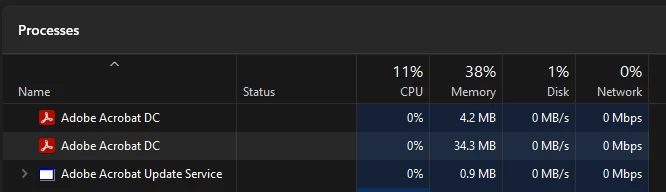
Running V 22.002.20212

Is anyone else experiancing this? 

If so how did you fix this? 


This topic is closed to new replies. Start a new post to keep the conversation going.

3 replies

Participant
October 27, 2022

I am running Acrobat Pro DC and am having the same issue. Any resolution would be very helpful

Translate
AkanchhaS8194121
Legend
October 28, 2022

Hi @Nicholas26573636muwo @chriss468969 


Thanks for reporting this to us. 

As seen in the image above, Acrobat shows the processes running in the background. However not launch on screen. 

We could try a couple of things to see if that helps. 

1- Once, close the background processes from the task manager>Reboot computer> and then Launch Acrobat.

2- Change the following security settings from Acrobat's preferences.

Navigate to Acrobat/Reader>Edit>Preferences>Security (Enhanced)>disable "Protected Mode at Startup", "Protected View" and "Enhanced Security">OK>close and reopen Acrobat/Reader

Note: these changes are only for testing purposes. Once tested, please change it back to the previous setting. 

3- If step-1 and 2 doesn't help, then 

Run this cleaner tool to remove the existing installer and application’s files traces:

https://www.adobe.com/devnet-docs/acrobatetk/tools/Labs/cleaner.html

Download the Acrobat installer from here:

https://helpx.adobe.com/acrobat/kb/acrobat-dc-downloads.html

Download the Acrobat Reader DC installer from here:

https://get.adobe.com/reader/enterprise/


Let us know the result.


Thanks,

Akanchha 

Translate
Participant
November 3, 2022

Good Day.

So upgrading to the .63 release seemed to sort out most issue except when opening a password protected document. 

Since yesterday the issue has returned in the it crashes in about 10s, just get a not responding. 

Even when just opening the app and not a document 

In Task manager it just sit here until you end Adobe


I am unable to upload the DMP file. 

thanks 


Translate