
Participant
January 4, 2018
Answered

Stamps & "fill & sign"

  • January 4, 2018
  • 3 replies
  • 4071 views

with Adobe Reader XI, we add a stamp to a pdf document (not a form) and apply initials using "fill & sign".  The document is then be reviewed by a second person, who  also adds a stamp and applies their initials.  After each stamping/initialling action, the next person could not modify or delete the stamp, and we used this as a simple way of recording when documents were reviewed & approved for release (much more efficient than obtaining ink signatures and scanning documents).

With Reader DC, when we apply the stamps and initials, anyone can move or delete these stamps.  I've read several posts on the forums that suggest that this should not be the case, that the stamped/initialled document is "flattened" when saved, but that is not what I am seeing.

I've tried several versions of DC over the past few months (most recently on 30th Dec 2017) hoping with each new version that the issue is resolved, but see the same behaviour each time.

Is ther a quick fix for this?  Some setting that I'm missing?  Please don't direct me to "cloud based services" as this is not a suitable option for our application.
    This topic has been closed for replies.
    Correct answer Abambo

    electronic signature (or digital signature) are the only possibility to guaranty that the document you got has not been altered after signing. It has nothing to do with flattened stamps or dynamic stamps.

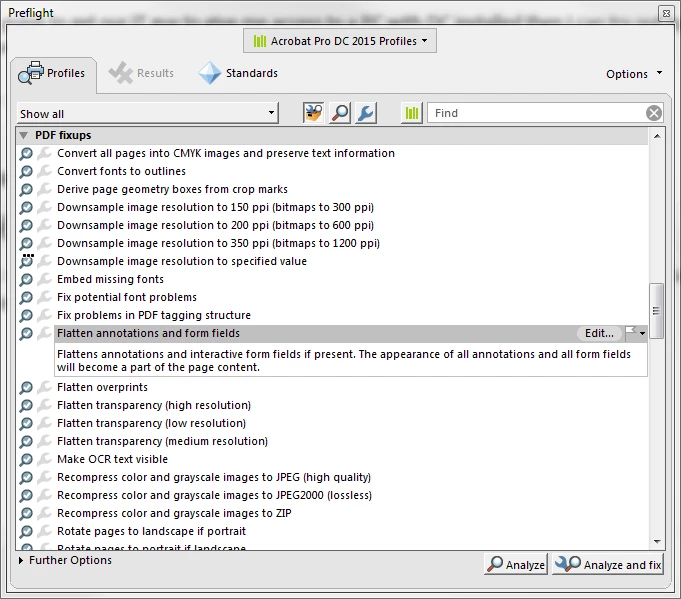
    May be Preflight could help you:

    3 replies

    Participant
    January 4, 2018

    Thanks for the replies folks.  It's really the stamps I wanted to flatten (this is the behaviour exhibited in XI) but I'm not seeing this in DC.  Stamps used are Dynamic (so we can get the time-stamp info).  In XI it seems to be the adding of the initials that causes the flattening action to occur, not the addition of the stamp itself, but this behaviour doesn't appear to be replicated in DC.

    I received a new document for release today with two stamps, one created in XI (which I could not move or delete) and one in DC (which I could move, delete etc.).

    Am going to get our IT guy to give me access to a PC with DC installed then I can try out options (including electonic signatures) for myself.

    try67
    Community Expert
    Community Expert
    January 4, 2018

    Maybe the stamp is locked. Do you see a padlock icon next to it in the Comments List panel?

    try67
    Community Expert
    Community Expert
    January 4, 2018

    I'm guessing that what you read about the stamps being "flattened" was in relation to dynamic stamps. What's being flattened is the stamp itself (ie, the fields within it) when you apply it, not the document that contains it. To prevent the file from being edited (or at least, being able to know if it was edited) a digital signature is the only option.

    Abambo
    Community Expert
    Community Expert
    January 4, 2018

    Did you consider the  electronic signature? May that be an option?

    I'm sure that the stamps could be removed also before by any person that could open and modify the document. Worse: the document could be altered without knowledge of the signing parties.

    ABAMBO | Hard- and Software Engineer | Photographer