Participating Frequently
November 1, 2021
Question

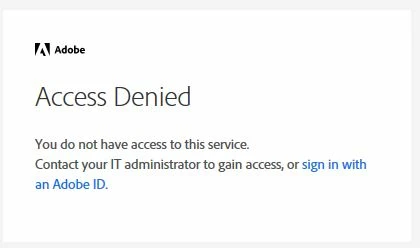
Started Getting Pop error message every time I open reader

  • November 1, 2021
  • 1 reply
  • 1211 views

I get a pop error message saying access denied, but once I close it Reader works normally. How can I stop this annoying pop up?

 

This topic has been closed for replies.

1 reply

Amal.
Legend
November 1, 2021

Hi there


Hope you are doing well and sorry to hear that. AS described you are getting the pop up for access denied on the startup of the application and the application works well once you close the pop up.


Would you mind sharing the version of the OS and the application you are using? To check the version of the application go to Help > About Acrobat and make sure you have the recent version 21.07.20099 installed. Go to Help > Check for updates and reboot the computer once.


Also try to reset the Acrobat preferences as described here https://community.adobe.com/t5/acrobat-discussions/how-to-reset-acrobat-preference-settings-to-default/m-p/4792082


Also try to create a new test user profile with full admin rights in Windows or enable the root account in Mac and try using the application there.


Regards

Amal


Participating Frequently
November 25, 2021

Amal,

 I'm using Windows 10. It is version 21.007.20099.61763

It does work from an Administrative Account but not a regular  user account.

Thanks,

Roger