Participant
July 9, 2018
Answered

Stop fill and sign saving signatures

  • July 9, 2018
  • 1 reply
  • 2312 views

My company want to use fill and sign fopr form signing however we dont want DC to save the signature as it could breach DP

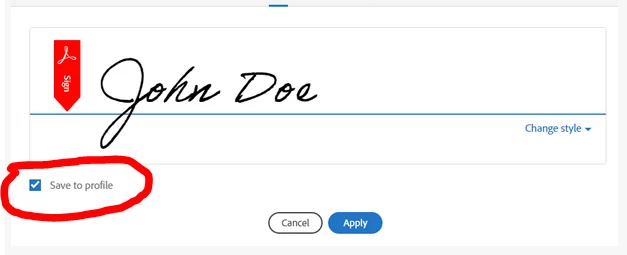
Is there any way i can turn off/lock thhis down? as the check box is checked by default see below for refernce
    This topic has been closed for replies.
    Correct answer AnandSri

    Hello Rattik,

    As per the description above, you want to disable the 'Save to Profile' in the Adobe Fill&Sign dialog box, Is that correct?

    You can uncheck the box before applying the signature using Adobe Fill&Sign, but there is no such option to remove the 'Save to profile' from the dialog box.

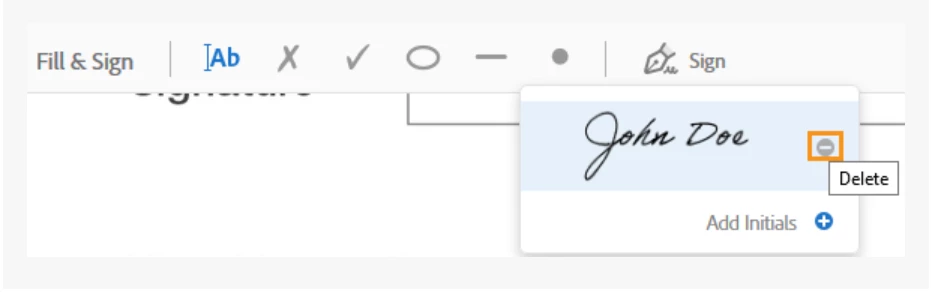
    You can delete the existing signatures, click on the Delete button next to the signature.

    You may also refer to the Adobe article Adobe Fill & Sign

    Feel free to update this discussion for any further assistance.

    Thanks,

    Anand Sri.

    1 reply

    AnandSri
    AnandSriCorrect answer
    Legend
    July 9, 2018

    Hello Rattik,

    As per the description above, you want to disable the 'Save to Profile' in the Adobe Fill&Sign dialog box, Is that correct?

    You can uncheck the box before applying the signature using Adobe Fill&Sign, but there is no such option to remove the 'Save to profile' from the dialog box.

    You can delete the existing signatures, click on the Delete button next to the signature.

    You may also refer to the Adobe article Adobe Fill & Sign

    Feel free to update this discussion for any further assistance.

    Thanks,

    Anand Sri.

    RattikAuthor
    Participant
    July 10, 2018

    Hi Anand

    Thanks for the reply

    I was looking for a disable option as I cant ensure that end users will uncheck the box, and our customers may not be happy if their signature is saved.

    But if there is no option to then I will have to trust in my end users

    Thank you again for the help