Participant
January 16, 2018
Question

the procedure Entry Point not found

  • January 16, 2018
  • 1 reply
  • 837 views

Hi,

I have tried registering the DLL again but that has not helped, re-installing visual studio c++ redistributable 2015 hasn't helped either
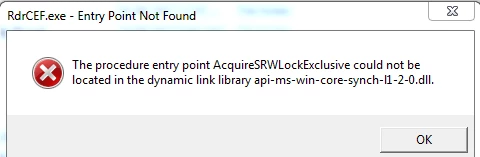
    This topic has been closed for replies.

    1 reply

    AnandSri
    Legend
    February 8, 2018

    Hello ernesth56911061

    Sorry for the delay in response to your query and apologize for the inconvenience caused. As per the description above, you are facing issue with the Adobe Reader as getting an error message, Is that correct?

    Please refer to the following KB docs and try the solution Acrobat error Entry Point Not Found when using with MS Office 2016

    If the issue still persists, please try repairing Microsoft office. Reboot the machine and see if this brings any difference.

    You can also try to update the Adobe Reader DC from Help>Check for updates. Try repairing the installation files of Adobe Reader from Help>Repair installation. Reboot the machine after the update and repair.

    If the issue is not resolved, please use Acrobat cleaner tool to remove Adobe Reader completely Download Adobe Reader and Acrobat Cleaner Tool - Adobe Labs  Link: https://labs.adobe.com/downloads/acrobatcleaner.html

    Reboot the machine, and install Adobe Reader from Adobe - Adobe Acrobat Reader DC Distribution Link: https://get.adobe.com/reader/enterprise/

    Let us know how it goes.

    Regards,

    Anand Sri.