


Participant
Jul 23, 2024 11:01 PM UTC
Answered

this file can't be previewed because of an error with the pdf preview handler

I am having trouble previewing PDFs in the Windows Explorer preview pane.  I am running Windows 11. I have tried everything I can think of, reinstalling Acrobat Reader, making it the default program, etc. I can preview Word files and images, so this problem only occurs with PDF files.
cheryl_7203Correct answer
Participant
Aug 22, 2025 3:03 PM UTC

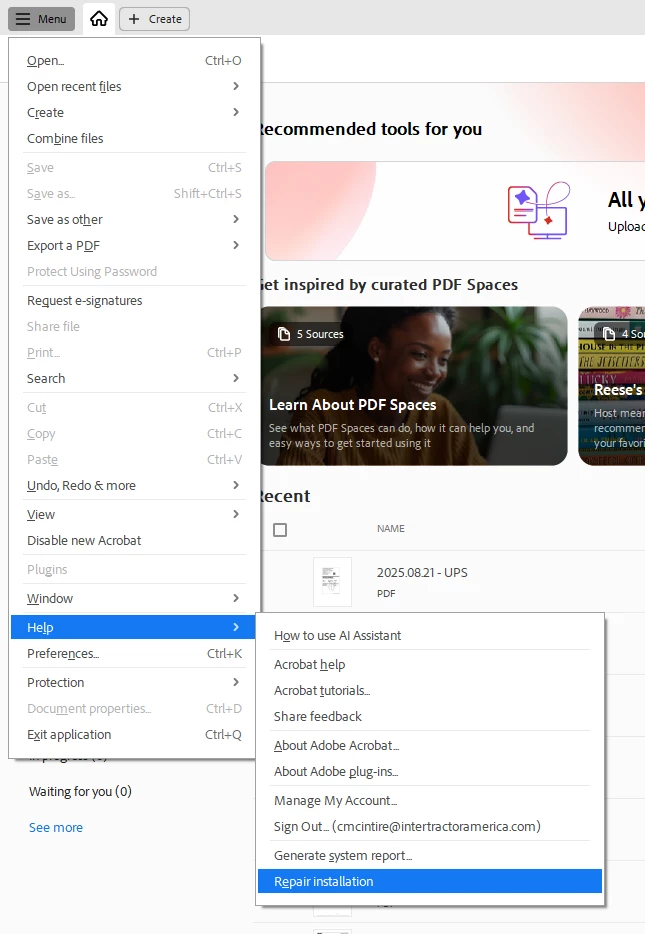
I have found the easiest way to fix this is to select the Menu > Help > Repair installation

See attached screen shot for details.


4 replies

cheryl_7203Correct answer
Participant
Aug 22, 2025 3:03 PM UTC

I have found the easiest way to fix this is to select the Menu > Help > Repair installation

See attached screen shot for details.


Translate
Participant
Nov 17, 2025 6:30 PM UTC

Thank you. Worked like a charm. 

Translate
radzmar
Community Expert
Community Expert
Aug 4, 2024 5:32 PM UTC

The Windows explorer preview pane has nothing to do with Acrobat Reader. If it's not working, you need to fix your windows. Reinstalling Reader won't fix anything about this. 

Translate
Participant
Jul 25, 2024 10:14 PM UTC

I'm having this issue with one of my customer's computers.  She recently purchased a Surface laptop 15 with the new arm-based chips. I was wondering if there may be a compatibility issue. I've gone through each step listed in the forums and have yet to find a solution. 

Translate