
Participant
Sep 27, 2022 2:13 PM UTC
Question

Toolbar positions changed for Acrobat Reader latest version

Hello all,

Windows 10 PC.

I downloaded from Adobe site Acrobat Reader Version 2022.002 yesterday and find that the toolbar positins are very different. What used to be on TOP ( in earlier versions of reader) are now on the Right hand side.

This is very disorienting and inconvenient to say the least.

Please advise if there is a way to change over to the earier positions. 
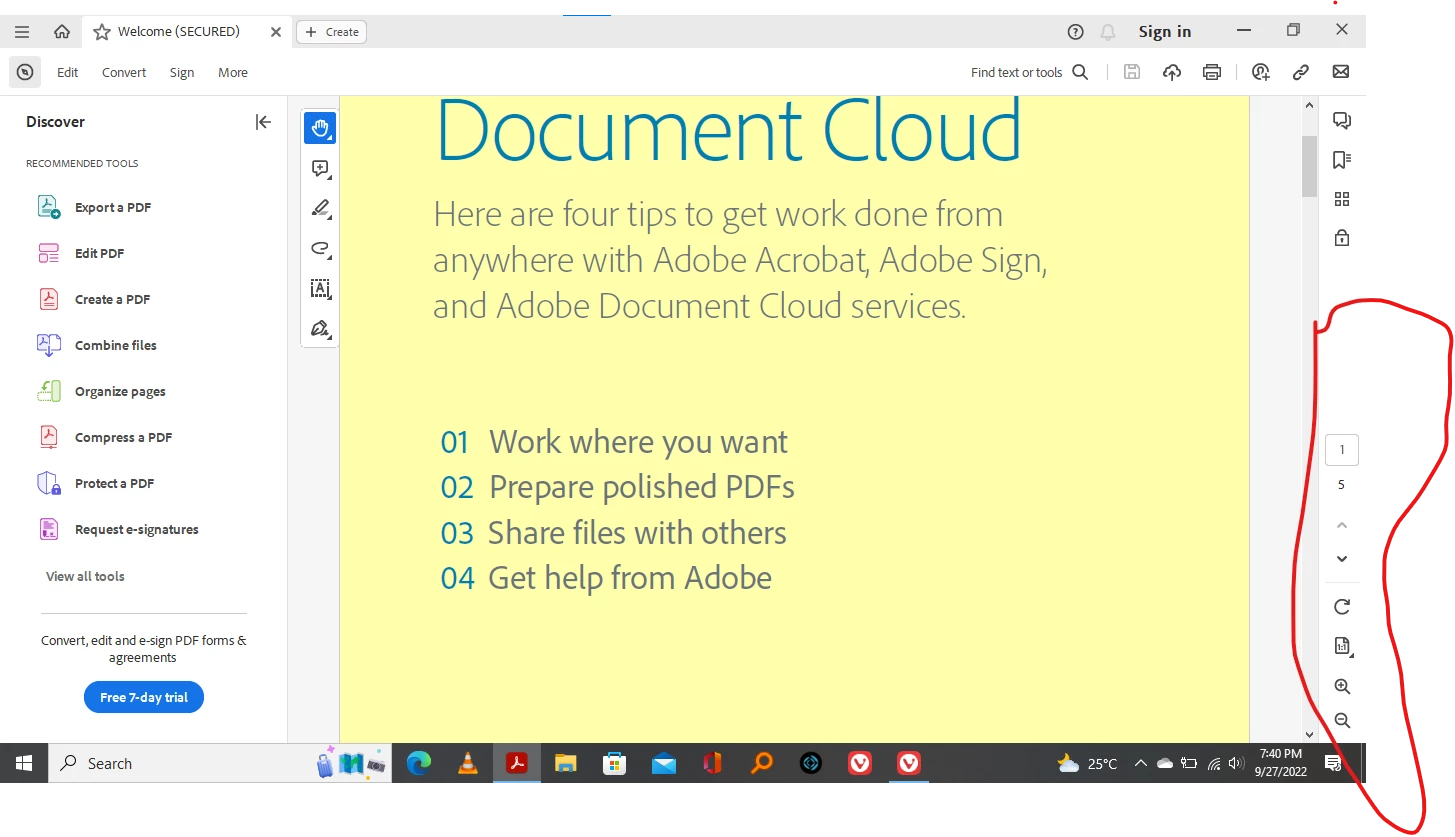
 

Thanks Kevin

This topic is closed to new replies. Start a new post to keep the conversation going.

4 replies

Bernd Alheit
Community Expert
Community Expert
Sep 28, 2022 7:20 AM UTC
kevinDAuthor
Participant
Sep 29, 2022 8:02 AM UTC

Thank you very much. What a relief. 

Translate
Bernd Alheit
Community Expert
Community Expert
Sep 27, 2022 4:41 PM UTC

This is a new feature.

Translate
kevinDAuthor
Participant
Sep 28, 2022 6:09 AM UTC

Thanks for your reply. So there is now ay to revert back to the earlier way of having the toolbars on the Top.

It is unusable for me this way. 

Time to look for alternatives.

best rgds


Translate