Participant
June 18, 2019
Answered

Touchpad scroll speed

  • June 18, 2019
  • 1 reply
  • 4717 views

Scroll speed is different between view/page display/enable scrolling and view/page display/single page view.

When using precision touchpad, way too fast for "enable scrolling", and a little bit slow for "single page view".

When using mouse wheel, correct speed for "enable scrolling", and way too slow for "single page view".

I believe the same issue is discussed at Scrolling too fast on Adobe Acrobat Pro DC​, however it is not being reviewed despite being the top result at https://www.google.com.au/search?q=adobe+reader+scroll+touchpad​.

Specs:

Windows 10

Surface Pro (2017)

Adobe Acrobat Reader DC 2019.012.20035

Logitech Mouse M337
This topic has been closed for replies.
Correct answer Amal.

Hi Nicholasd,

Apologies for the delay in response, I hope you would be able to fix it by now.

If the problem still persists, You may please try the following troubleshooting steps:

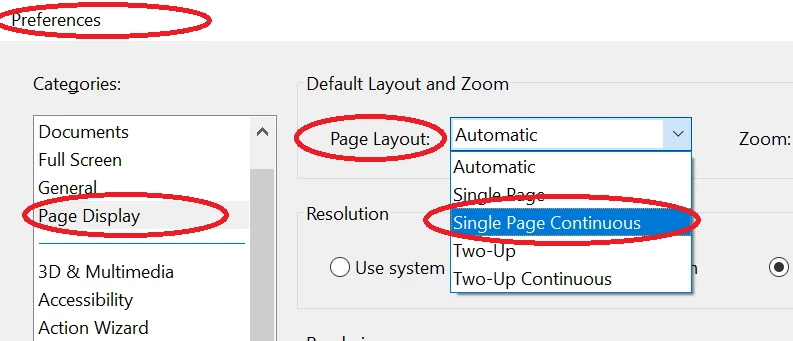
  • Go to Edit > Preferences > Page Display > Page Layout > Select Single Page Continuous.

  • Click OK

You may also try :

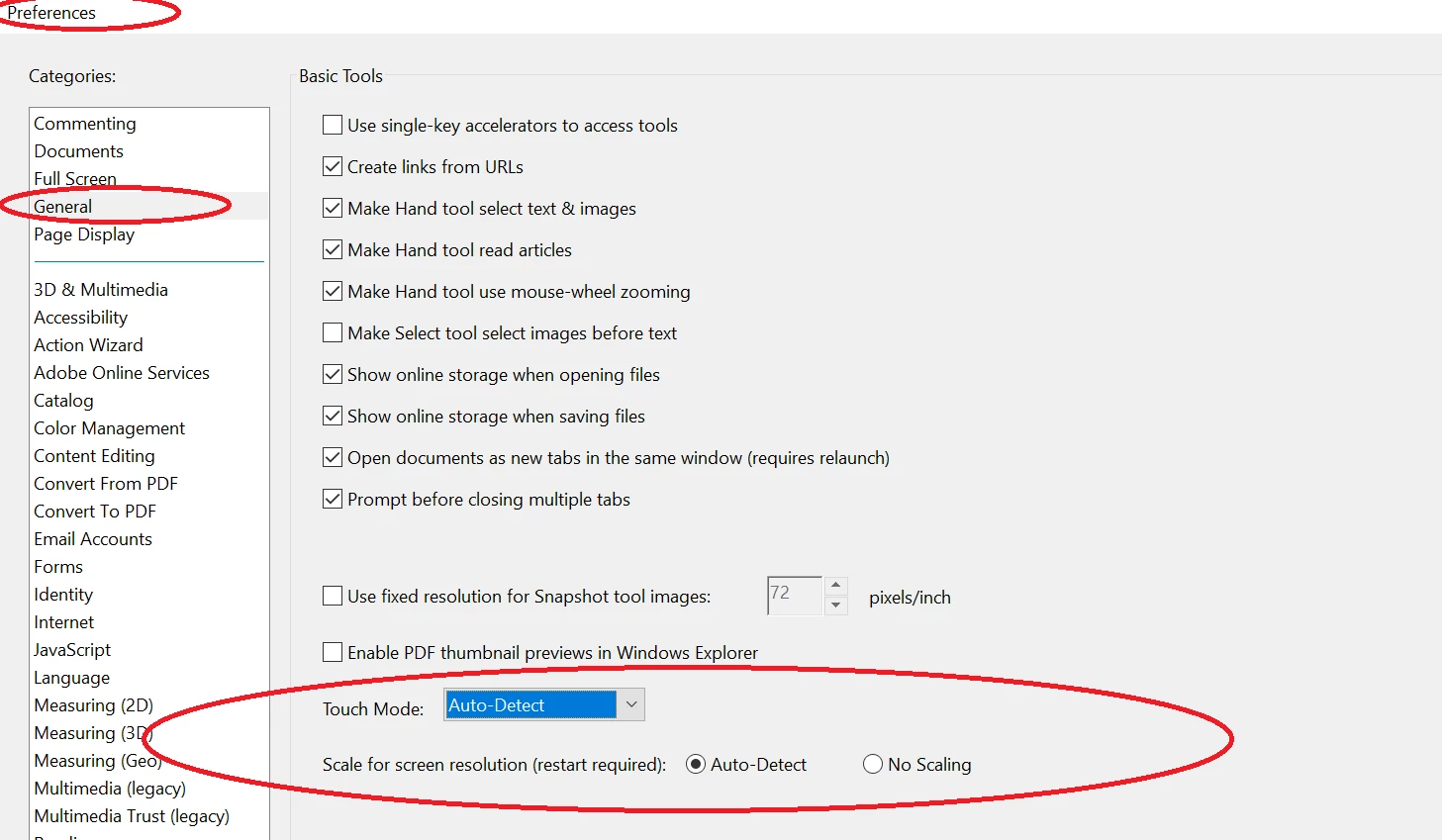
  • Go to Edit > Preferences > General > Touch Mode > Select Auto Detect and select Scaling to Auto detect.

  • Click OK.
  • Restart the application and check.

Let us know if that works for you

Regards,

Amal

1 reply

Amal.
Community Manager
Amal.Community ManagerCorrect answer
Community Manager
August 8, 2019

Hi Nicholasd,

Apologies for the delay in response, I hope you would be able to fix it by now.

If the problem still persists, You may please try the following troubleshooting steps:

  • Go to Edit > Preferences > Page Display > Page Layout > Select Single Page Continuous.

  • Click OK

You may also try :

  • Go to Edit > Preferences > General > Touch Mode > Select Auto Detect and select Scaling to Auto detect.

  • Click OK.
  • Restart the application and check.

Let us know if that works for you

Regards,

Amal

Participant
September 14, 2019

Thanks Amal,
It works as expected now.