davidl8662109
Participant
November 6, 2019
Question

Unable to Disable Welcome to Adobe Reader DC since upgrade to 19.021.20047

  • November 6, 2019
  • 2 replies
  • 2498 views

I have been deploying Adobe Reader DC to our Windows workstations for some time. I have Disabled the Welcome to Acrobat DC screen that has shown things like Get App for "Go mobile with your PDFs" for example as we dont allow users to click on these type of buttons.


This has been done by setting Registry keys the Policies section.


It appears that the new 19.021.20047 version does not use these settings as it is showing again. The last version we deployed that was fine was 19.012.20036
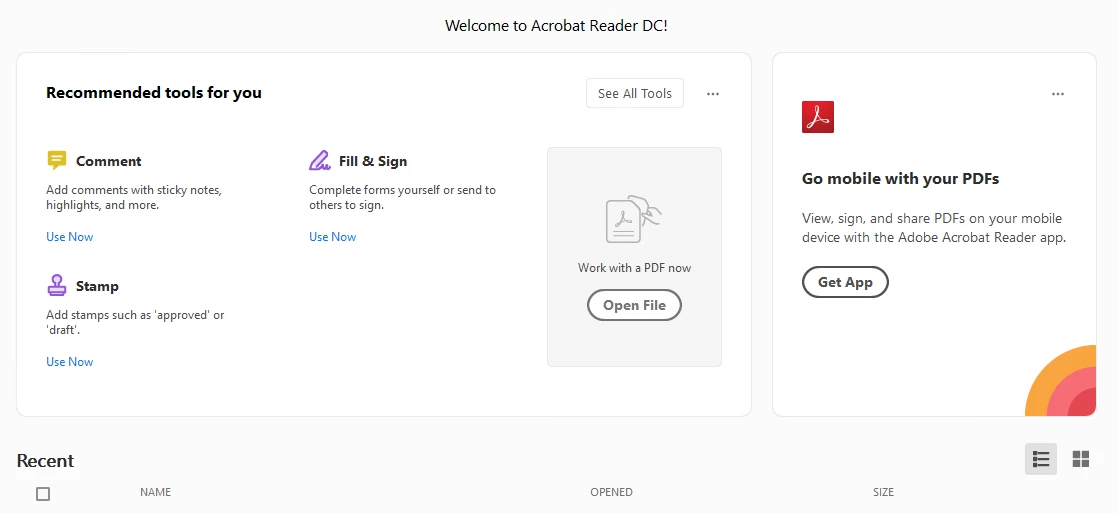
Has anyone come across this issue?

This topic has been closed for replies.

2 replies

Participant
November 19, 2019

The proper way to disable these features is through the Asset Settings in the Admin Console on line.  In the console choose Settings > Asset Settings and read the options.  You can select No Sharing here for all your clients.


Participating Frequently
April 24, 2020

It looks like the registry key to remove "Welcome to Adobe Reader!" has changed. I have tried that and it worked for me. 


[HKEY_CURRENT_USER\Software\Adobe\Acrobat Reader\DC\HomeWelcomeFirstMileReader]
"iFirstMileStage"=dword:00000001
"bHasShownReaderAppCard"=dword:00000001
"bHasShownScanAppCard"=dword:00000001
"bScanAppUsed"=dword:00000001
"bFirstMileMinimized"=dword:00000001

ls_rbls
Community Expert
Community Expert
November 11, 2019

Hi,


Can you apply the latest two updates .20048 and .20049 first.


See if  by applying the last two updates that were published last month it fixes that issue. 

davidl8662109
Participant
November 11, 2019

Thank you for the reply, I tried the .20049 update but it didnt appear to make any difference.