Participant
May 3, 2018
Answered

unable to install latest patch

  • May 3, 2018
  • 1 reply
  • 2426 views

Hi Team,

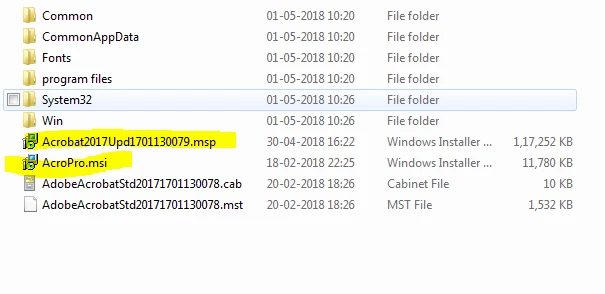
I have base system file(msi) and latest security patch(msp)-2017.011.30079. please check below image. 2017.011.30078 is installed in my machine.


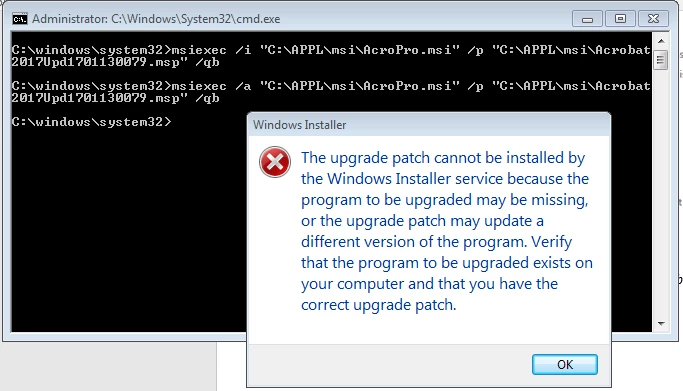
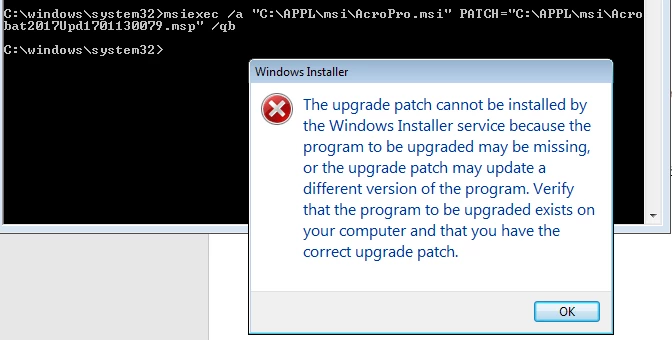
But when i try to install from command prompt, below errors are coming.

Please check the commands and suggest me how to fix this issue.

Regards,

Sreenath

    This topic has been closed for replies.
    Correct answer Tariq Ahmad

    Hi Sreenath,

    Sorry for the delay in response. I hope you already have resolved this issue by now, if not, you may check this.

    The patch you are trying to install is 17.011.30079 is an optional patch, often called out of cycle patch. DC Release Notes — Release Notes for Acrobat DC Products In order to install this particular patch 17.011.30079 you must have the very recent patch already installed on the machine which was 17.011.30078, if the patch is not installed it won't let you install.

    Alternatively, you can install the next quarterly update patch 17.011.30080 which includes all the fixes or security fixes in it.

    If you have further questions feel free to update the discussion.

    -Tariq Dar

    1 reply

    Bernd Alheit
    Community Expert
    Community Expert
    May 3, 2018

    You can't update Acrobat Reader with this files.

    Participant
    May 3, 2018

    Hi Bernd,

    Thanks for your reply.

    But I am trying this by Adobe Acrobat Standard and facing the above issues while upgrading.


    Can you please tell me how to proceed further to get updated to latest one ?

    Regards,

    Sreenath

    Bernd Alheit
    Community Expert
    Community Expert
    May 3, 2018

    Try a forum for Adobe Acrobat.