
Participant
November 14, 2019
Answered

Unable to open Adobe Reader files in OneDrive

  • November 14, 2019
  • 2 replies
  • 48821 views

We have a user that copied her PDF files to her OneDrive and is not able to open them in OneDrive.

If the user copies the files to her local machine - she able to open them without issue. User is currently running Adobe Acrobat Reader 11.0.00 ?


We have tried using both Reader DC and Reader XI


Thanks.
Correct answer johnl95964069

I also found these posts when using the error message.


https://community.adobe.com/t5/Acrobat-Reader/There-was-an-error-opening-this-document-Access-denied/td-p/9597315

https://windowsreport.com/there-was-an-error-opening-this-document-access-denied/
Adobe Reader access denied when opening PDF – This issue can occur if you have Protected Mode enabled in Adobe Reader. Simply disable this feature and the problem should be gone. 


https://answers.acrobatusers.com/Cannot-open-a-PDF-file-keep-getting-There-was-an-error-opening-this-document-Access-was-denied-q11975.aspx


Logging out and logging back in did not resovle the issue.


I am going to first update the Reader DC to the latest version and see if that resolves the issue - if not then I will try disabling the Protected Mode.


To be continued....


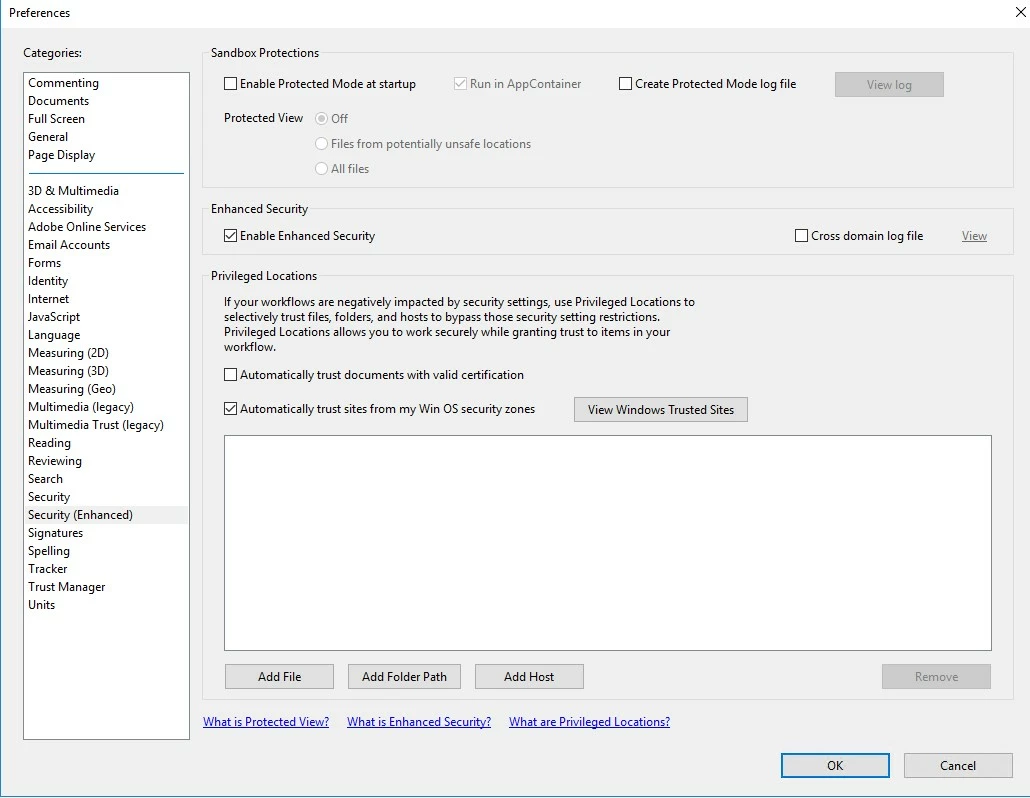
By unchecking the "Enable Protected Mode at Startup" box and closing and opening Adober Reader DC ..

That resolved our issue.

Thanks for everyone for all the help!

2 replies

Participant
January 16, 2023

Thanks. I found out that logging in OneDrive.live.com, I could access these documents !

AkanchhaS8194121
Legend
November 15, 2019

Hi there!


Thanks for sharing the information.

As mentioned One Drive files are not opening either with Reader XI of Reader DC. Is there any error message coming up or the file is just not opening?

You may check with your One Drive account, Sign Out and Sign In back.

Check wether you have got the most recent patch of Adobe Reader insalled or not.


Thanks,

Akanchha 


Participant
November 16, 2019

Participant
November 16, 2019

I also found these posts when using the error message.


https://community.adobe.com/t5/Acrobat-Reader/There-was-an-error-opening-this-document-Access-denied/td-p/9597315

https://windowsreport.com/there-was-an-error-opening-this-document-access-denied/
Adobe Reader access denied when opening PDF – This issue can occur if you have Protected Mode enabled in Adobe Reader. Simply disable this feature and the problem should be gone. 


https://answers.acrobatusers.com/Cannot-open-a-PDF-file-keep-getting-There-was-an-error-opening-this-document-Access-was-denied-q11975.aspx


Logging out and logging back in did not resovle the issue.


I am going to first update the Reader DC to the latest version and see if that resolves the issue - if not then I will try disabling the Protected Mode.


To be continued....