
samn52208749
Participant
October 8, 2018
Answered

Unable to Sign with a Certificate after Upgrade to DC v2019.008.20071

  • October 8, 2018
  • 2 replies
  • 20647 views

Hello,

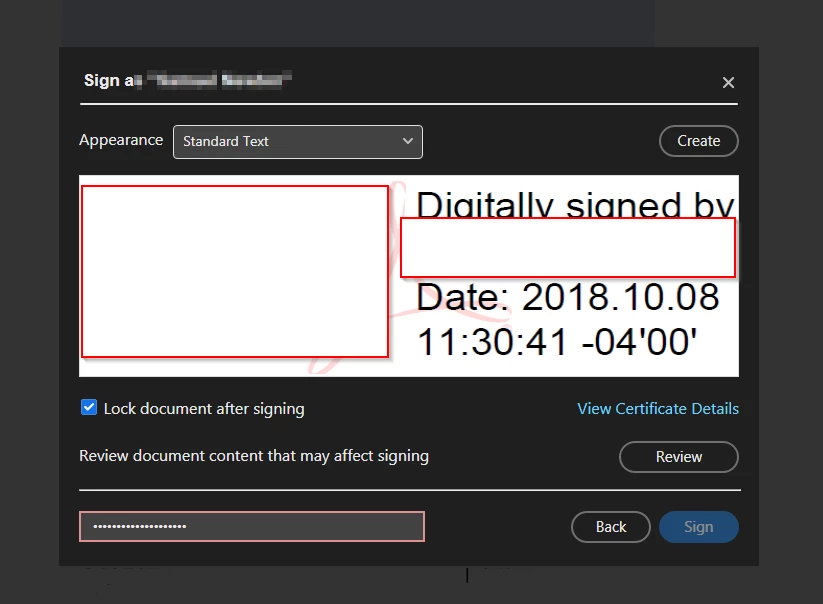
Up until we upgraded to the latest Adobe Reader DC, I was able to sign documents with a certificate.  Since the update, no matter what I have tried the "Sign" button remains greyed out and can no longer be used.

I have tried uninstalling, deleting all Adobe program and AppData folders, re-installing, deleting certificates and signatures, and recreating a new certificate.  It sill will not allow me to sign - I have verified I am using the correct password for the certificate that was created.  I have tried it with and without the "Lock document after signing" options.  I have tried the Review option, but it says there are no issues.
This topic has been closed for replies.
Correct answer AkanchhaS8194121

I just upgraded this past week and now I can't sign with certificates. This is a big issue for me. I'm a therapist and I send a lot of documents electronically; having a certificate indicates to the recipient that the document is actually from me and is therefore an official, legal part of the client's record. Why was this functionality removed? And is it going to be reinstated? I can't imagine I'm the only person who found it extremely useful.


christinem35182799 this functionality hasn't been removed with the latest version. Please follow all the instructions given above. Also,  check whether you are allowed to add signature to the document or not? Open PDF>right click "Document Properties">Security>Signing "Allowed"

Sign Out and Sign in from the application and check with a different pdf to see whether you are able to apply signature or not?

If nothing works, and you are unable to sign any pdf digitally. Then as a work around delete the current digital signature and recreate one.

-Akanchha

2 replies

AnandSri
Legend
October 15, 2018

Hi All,

We're sorry for the trouble you had with Adobe Reader, please install the latest patch of Adobe Reader version 19.008.20074 from help>check for updates, or manually from 19.008.20074 Optional update, October 08, 2018 — Release Notes for Acrobat DC Products

Reboot the machine and check.

Are you using the Signature with certificate tool or Fill&Sign tool?

Is it happening with all the PDF files or with specific PDF file?

Is it a Mac or Windows machine and what is the version?

Check the dot version of Adobe Reader installed before updating it to the latest version. To identify the version, refer to Identify the product and its version for Acrobat and Reader DC

Let us know how it goes and share your observation.

Thanks,

Anand Sri.

srichmon7578
Participant
October 15, 2018

Thank you so, so much for your quick response!!

Only problem, I had just seen in a previous post that someone suggested this so I attempted it and was told that I already had a system in place that was more advanced and that the download was cancelled.

Any chance you know what this means?

Thanks again for your help!!

Shannon

Participant
October 13, 2018

I have the same problem my saved signature disappeared and now i don't even have the option to "add initials" or add signature it is completely blank.....someone out is cyber space please help us?

srichmon7578
Participant
October 15, 2018

Same exact problem here- was signing everything without issue until last week. Now I can't see anything but a blank box when I click on "sign".

I called the company directly and the person assisting me told me that he could not help but to post the question here... anyone able to help???

Thanks!!!