Participant
October 4, 2018
Answered

Unbale to update Acrobat Reader DC - 2019.008.20071 MSP Patch

  • October 4, 2018
  • 1 reply
  • 5392 views

I am trying to update Adobe Acrobat Reader DC, continues TRACK with "AcroRdrDCUpd1900820071.msp".

AcroRdrDCUpd1900820071.msp throws error during installation " Product: Adobe Acrobat Reader DC -- Error 1606.Could not access network location This is the default property for default.mst file."
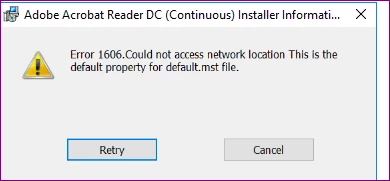
Anyone else facing same issue with patch installation or any idea how to solve this ?

Thanks in Advance

Regards,

Deept

This topic has been closed for replies.
Correct answer Mohd Amish

Please try the cleaner at: Download Adobe Reader and Acrobat Cleaner Tool - Adobe Labs and then retry installation.

1 reply

Mohd AmishCorrect answer
Adobe Employee
October 8, 2018

Please try the cleaner at: Download Adobe Reader and Acrobat Cleaner Tool - Adobe Labs and then retry installation.

Participant
October 9, 2018

Thanks Mohd Amish,

issue resolved after uninstalling the old version Acrobat and deleting few office registry.

HKEY_LOCAL_MACHINE\Software\Microsoft\Office\16.0

Regards,

pawelk75571721
Participating Frequently
October 9, 2018

Could you please provide me some detailed information about registry keys, that I should delete ?

I've been trying to install 19.008.20071 and 19.008.20074. My current version is 18.011.20063. Installer returns error 1606. MSP is distributed by SCCM.