
Participant
October 6, 2021
Question

Unknown error System Information CGetSigningParams-4043

  • October 6, 2021
  • 1 reply
  • 2862 views

I have a document that requires a digital signature, as soon as the field is clicked a dialog opens that lets me select the signature I want to use. I've used this digital signature many times without error before.

Now when I select the signature I receive this error:
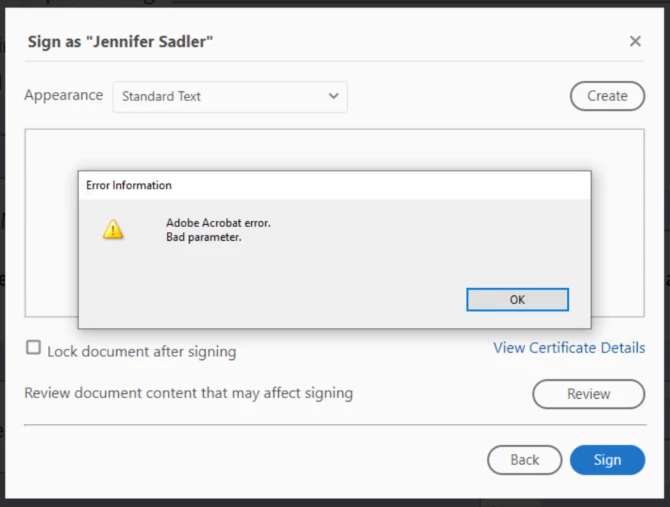
 

I then cliek OK and this dialog appears:
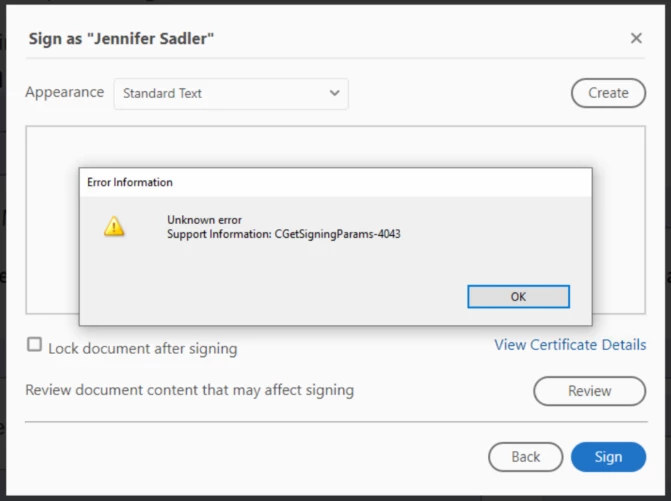
I've deleted and recrewated the signature but still receive the same error.


Can anyone point me to some documentation that defines what CGetSigningParams-4043 is and how to resolve it?


Thanks.

This topic has been closed for replies.

1 reply

Ria Tagra
Inspiring
December 1, 2021

Hi 


Sorry for the delayed response.


Please try the below steps and let us know how it works on your end.

  1. Launch Adobe Reader
  2. Select Edit -> Preferences...
  3. Select "Signatures" from Categories
  4. Click "More..." button on Creation & Appearance block
  5. Uncheck "Use modern user interface for signing and Digital ID configuration"
  6. Click "OK" button and then again click "OK" button on Preference dialog


Regards

Ria

stephanies4995257
Participant
January 14, 2022

I am getting the exact same error message, even though it worked perfectly a week ago.  Ria, I tried the directions you listed above, but there isn't a change. It doesn't list the error number as 4043, but there is still an error.  And it isn't able to make the signature.  


Please assist.  Thank you! 


Participant
January 3, 2023

I have the same problem. The change described above did not help.