


Participant
July 19, 2021
Question

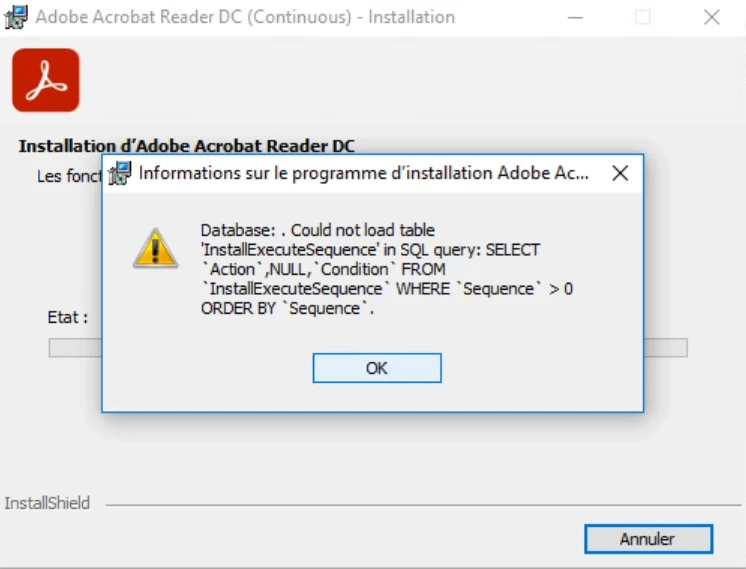
Update : Database could not load table

  • July 19, 2021
  • 1 reply
  • 29024 views

Hello,


I have the version 2019.021.20058 and I try to install the latest version of adobe acrobat reader DC, but when the update start I have this error : "Database could not load table 'InstallExecuteSequence'".

Do you have a clue to realize the installation ?


Best Regards,

This topic has been closed for replies.

1 reply

Amal.
Community Manager
Community Manager
July 20, 2021

Hi there


Hope you are doing well and sorry for the trouble. As described you are unable to update the Acrobat Reader and getting the above mentioned error


Please check out the steps shared in the help page https://helpx.adobe.com/ca/acrobat/kb/update-errors-acrobat-reader-windows.htmland see if that works for you.


Let us know if you experience any trouble and need more help.


Regards

Amal

Participant
July 20, 2021

Hello Amal,


Thanks for your reply,

I checked the log, and I have the error code number : 2229

This error is not listed on your link. If you have another idea 🙂 ? 

Best Regards


Amal.
Community Manager
Community Manager
July 21, 2021

Hi there


Thanks for sharing the information. It seems to be a Windows error. Please try to create a new test user profile with full admin rights and try using nd updating the application there and check.


Regards

Amal