
Participant
July 6, 2023
Question

Update to Reader failing with ERROR 1335.

  • July 6, 2023
  • 1 reply
  • 267 views

When atttepting to upgrade Reader 22.3.20322  to 2023.003.20215 , I'm getting an error 1335 (as per the attached screen grab)
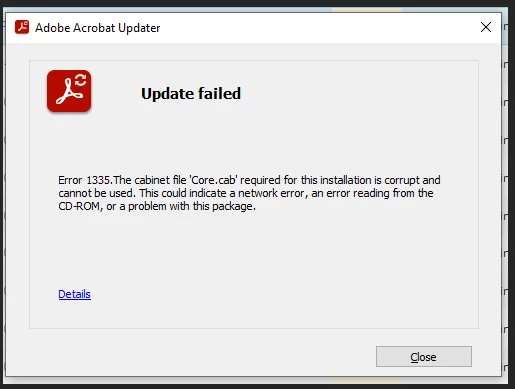
 

Problem occurs if I attempt to update via the Reader application , via  our RMM Suite (N-Central) or if I down load the relevant .msp file .


If, however, I uninstall the application and then re-install Reader from the Adobe site.....it install without issue.

I'm running Windows 10 Pro 22H2


This topic has been closed for replies.

1 reply

Amal.
Legend
July 21, 2023

Hi @PriteshYBS 


Hope you are doing well and thanks for reaching out.


The message "Corrupt cabinet file" appears if the downloaded file you're trying to open is damaged. Downloaded files are more susceptible to damage when downloaded during peak periods or over an unstable Internet connection. The message also appears if your Internet connection was broken while the file was downloading. Your Internet service provider (ISP) maintains the connection when it detects activity, such as when you visit Web sites or send e-mail. The ISP doesn't detect activity when you are only downloading a file.

For more info please go through the help page https://helpx.adobe.com/x-productkb/global/error-corrupt-cabinet-file-open.html and see if that works.

Also please check the MS help article that i have found https://answers.microsoft.com/en-us/windows/forum/all/error-1335-cabinet-file-corrupted/5a329306-cda7-4237-ba99-a66010bf2413 and check.


Regards

Amal