
Participant
Jun 30, 2022 4:19 PM UTC
Question

Updated one hour ago - Some strange bug with ESC key

Hi, my Adobe Acrobate Reader DC just updated one hour ago (version 2022.001.20142) and I found some really strange and annoying bug.

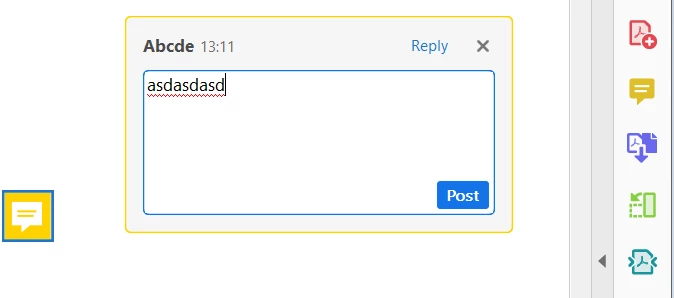
In the previous version, when I was writing a comment in the comment box, after finishing I used to press ESC key to close the comment box. The text was still there in the comment box.


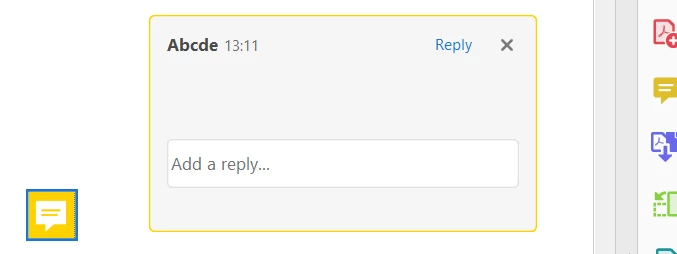
But in the new update, after writing and pressing ESC to close the comment box, the box closes, but the text is complete deleted. And now there is an empty comment box . So now, after writing a comment and pressing ESC it deletes the complete text.

Before pressing ESC key:
 

After pressing ESC key:
 

Any idea what can be happening?


Thank you!

This topic is closed to new replies. Start a new post to keep the conversation going.

6 replies

Participating Frequently
Feb 25, 2023 6:24 PM UTC
Meenakshi_Negi
Legend
Jul 1, 2022 12:12 PM UTC

Hello,


Thank you for reaching out and reporting this.


We are currently looking into this issue.

Would you mind sharing the OS version you are using on the machine?


Thanks,

Meenakshi

Translate
Participant
Jul 1, 2022 1:53 PM UTC

Hi Meenakshi,


I'm using Windows 10 Pro, Version 21H2. All Windows updated are up to date.


Regards,

Translate
Meenakshi_Negi
Legend
Jul 11, 2022 3:26 PM UTC

Hi Monsieur,


Thank you for being so patient. 


The behavior of Esc would be to discard any draft content typed in the comment box. To post the comment, either the Post button be clicked, or Alt+Enter be pressed. Further, a mouse click on the document will also post the comment. So, apart from the Esc key, all other ways to post the comment are retained.


Thanks,

Meenakshi

Translate