Participant
February 28, 2018
Answered

Using a signature pad to place a visible signature on a .pdf

  • February 28, 2018
  • 1 reply
  • 4778 views

I would like to use a EPAD signature pad to add signatures to an existing .pdf file. How can I use the signature pad I have to do this? As of right now I can only use the computer mouse to make the signatures.
    This topic has been closed for replies.
    Correct answer AkanchhaS8194121

    Hi Davidl,

    Sorry for the delay in response to your query.

    We are not sure about how does EPAD mechanism works or whether it save a copy of the signature created using it.

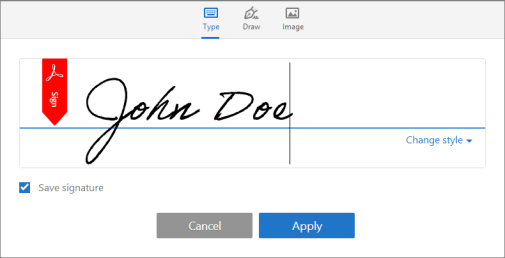
    If you are using Adobe Reader DC desktop application, then its Fill & Sign feature allows to "Type, Draw & add Image" of the signature the. As shown in picture below-

    Type, draw, or import a signature image

    You can also refer to the help document Using Acrobat Reader DC Fill & Sign  for detailed description.

    Hope this will help.

    Regards,

    Akanchha 

    1 reply

    AkanchhaS8194121
    AkanchhaS8194121Correct answer
    Legend
    April 20, 2018

    Hi Davidl,

    Sorry for the delay in response to your query.

    We are not sure about how does EPAD mechanism works or whether it save a copy of the signature created using it.

    If you are using Adobe Reader DC desktop application, then its Fill & Sign feature allows to "Type, Draw & add Image" of the signature the. As shown in picture below-

    Type, draw, or import a signature image

    You can also refer to the help document Using Acrobat Reader DC Fill & Sign  for detailed description.

    Hope this will help.

    Regards,

    Akanchha