
March 10, 2011
Question

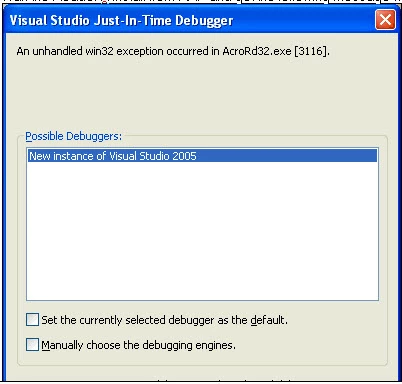
Visual Studio Just-In-Time Debugger error "An unhandled win32 exception occurred in AcroRd32.exe [31

  • March 10, 2011
  • 3 replies
  • 25857 views

I installed Reader X and when I tried opening it, I received a Visual Studio Just-in-time Debugger error "An unhandled win32 exception occurred in AcroRd32.exe [3116].  I uninstalled, rebooted and tried reinstalling and received the same error.

I tried disabling the just in time debugger mentioned in http://www.programmerfish.com/disable-visual-studio-just-in-time-debugger/ and received the error "An unhandled win32 exception occurred in AcroRd32.exe [4080].  Just-in-time debugging this exception failed with the following error:  No installed debugger has just-in-time debugging enabled.  In Visual Studio, Just-in-time debugging can be enabled.....

I do have Microsoft Visual Studio 2005 installed.

Any ideas?
    This topic has been closed for replies.

    3 replies

    Participating Frequently
    January 11, 2019

    We also have this issue  on win 2016 server... looking for answer

    Participant
    December 10, 2011

    I was also having the same problem as described above .I tried out various things given by various websites,but nothing happened. So at last i uninstalled adobe reader X, and everything got correct.At last i installed Adobe Reader 9.X.

    Participant
    September 16, 2011

    Have you received a response to this yet? We have a user at our facility who is experiencing the same problem with right clicking and printing a PDF from Microsoft Outlook 2007. The user had Visual Studio installed a few weeks back, but it was not being utilized so we removed it. A few weeks later, the error is generating again. Visual Studio is still not on the machine.

    "Event Type: Information
    Event Source: Application Popup
    Event Category: None
    Event ID: 26
    Date:  9/16/2011
    Time:  2:31:55 PM
    User:  N/A
    Computer: """"""""""
    Description:
    Application popup: Visual Studio Just-In-Time Debugger : An unhandled win32 exception occurred in AcroRd32.exe [2728]. Just-In-Time debugging this exception failed with the following error: No installed debugger has Just-In-Time debugging enabled. In Visual Studio, Just-In-Time debugging can be enabled from Tools/Options/Debugging/Just-In-Time.

    Check the documentation index for 'Just-in-time debugging, errors' for more information.

    For more information, see Help and Support Center at http://go.microsoft.com/fwlink/events.asp."

    September 19, 2011

    We discovered that Reader X users that had an older version of PGP installed received this error. We implemented a registry change on these devices which resolved the issued. PGP recognized it was an incompatibility issue on their end, and supposedly, with the newer version of PGP it will be resolved.  In order to resolve this, try using Adobe Readers whitelisting feature.  Below are the steps to follow: 

      i.   Add a registry entry enabling the use of whitelisting:
           [HKEY_LOCAL_MACHINE\SOFTWARE\Policies\Adobe\Acrobat Reader\10.0\FeatureLockDown]
           "bUseWhitelistConfigFile"=dword:00000001

      ii.  Create a whitelist file called "ProtectedModeWhitelistConfig.txt" and place it
           in the Adobe Reader executable path i.e. C:\Program Files\Adobe\Reader 10.0\Reader

      iii. The ProtectedModeWhitelistConfig.txt file will need to contain the string
           SECTION_ALLOW_ANY = *PGPhk*

    Participant
    September 19, 2011

    Pardon my ignorance, but what is PGP? Don't believe we have heard of this nor is it installed on our system. So, unfortunately, looks like our issue exists without a root cause.

    Thanks for the update!