Participant
November 10, 2017
Answered

Want to add an dictionary

  • November 10, 2017
  • 4 replies
  • 81373 views

I want to add an dictionary to acrobat reader DC. My dictionary is Dutch, but I need French too because I live in Belgium. How can I do this?

    This topic has been closed for replies.
    Correct answer Tariq Ahmad

    Hi

    Sorry for the delay in response.

    I hope you already have found an answer to this question. If not, please download the dictionary pack using this link: Adobe - Adobe Reader : For Windows : Adobe Acrobat/Reader DC Spelling Dictionary Pack (Continuous) : Thank You Once the pack is downloaded, make sure Reader is closed. Install the pack and it should be available to use.

    To choose your pack, launch Reader after the pack is installed, click on Edit>Preferences>Spelling> Click on "Add..." button and choose the language.
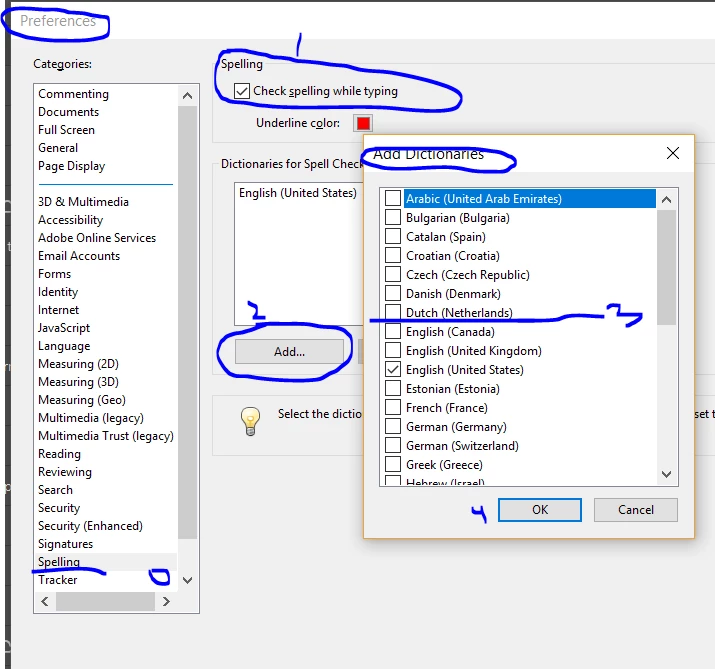
    Let us know if that helps.

    -Tariq Dar

    4 replies

    Participant
    January 7, 2021

    hii.. in my adobe reader. there is only one dictionary - turkish. 

    i want to translate from english to turkish in pdf.

    how can i do?

    Participant
    September 11, 2022
    Participant
    July 22, 2020

    und was muss man machen, damit einem so viele Sprachen zur Auswahl stehen? Ich kann Englisch nicht als Dictionary Sprache auswählen weil es bei mir keine Option ist. 😞

    Participant
    November 13, 2019

    Tried this process and no dictionaries are available to add.  What can I try next?


    Tariq AhmadCommunity ManagerCorrect answer
    Community Manager
    December 21, 2017

    Hi

    Sorry for the delay in response.

    I hope you already have found an answer to this question. If not, please download the dictionary pack using this link: Adobe - Adobe Reader : For Windows : Adobe Acrobat/Reader DC Spelling Dictionary Pack (Continuous) : Thank You Once the pack is downloaded, make sure Reader is closed. Install the pack and it should be available to use.

    To choose your pack, launch Reader after the pack is installed, click on Edit>Preferences>Spelling> Click on "Add..." button and choose the language.

    Let us know if that helps.

    -Tariq Dar

    Participant
    November 6, 2019

    Hi,


    There seems not to be Finnish language on the list. Is this not available?