JWRrr
Participant
February 11, 2016
Answered

What's the quickest way to change highlight colors in Adobe Acrobat Reader DC? (The best I can do is 7 clicks!)

  • February 11, 2016
  • 5 replies
  • 13783 views

There must be a one or two click way to change the colour / color of the highlighting?

Using Mac.

Read forum post about this, can't find an answer.
Correct answer Document Geek

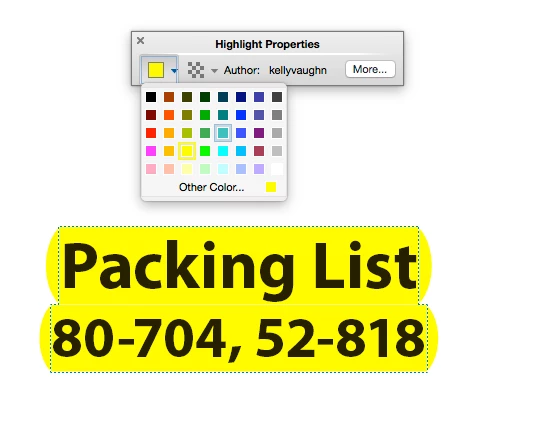
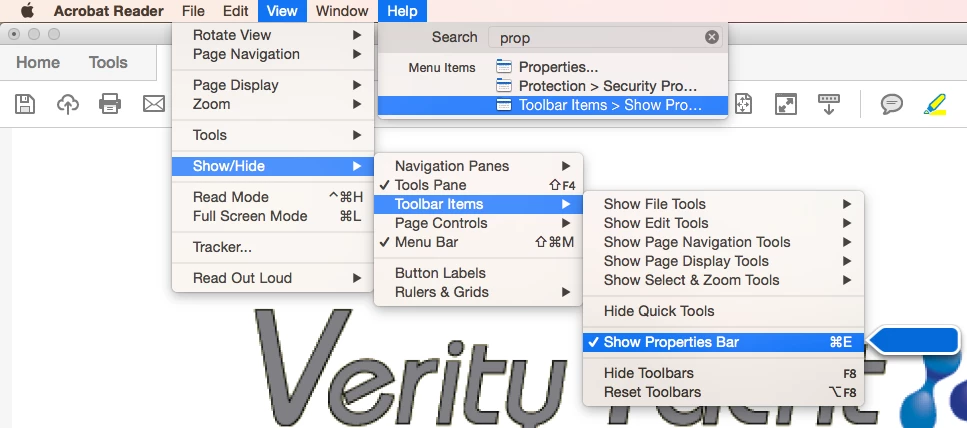
Bring up the Properties bar. Cmd + E.

5 replies

JR Boulay
Community Expert
Community Expert
March 14, 2025

[MOVED TO THE ACROBAT READER DISCUSSIONS]

Acrobate du PDF, InDesigner et Photoshopographe
Participant
July 27, 2022

Now (July 2022) you bring up ctrl+e

or else right click the Highlighter pen icon, right click it, then select "Show Properties Bar" 

either way, then click on the little colored box in the relatively small properties box that appears and the color palette will open.  

Dantastic!
Participant
November 3, 2018

I assume the CMD+E is a MAC thing? Does it work for Win 10? WIN+E? CTL+E? ALT+E? And how does the color bar once found, get added to the toolbar? When I originally started my document the color bar was right next to the highlighter tool, when I reopened it, it was gone and nowhere in the menus. Also, your top bar, File Edit View, etc, does not exist in my version of AAR RC. How do I call it up?

Thanks

DN

try67
Community Expert
Community Expert
November 3, 2018

Yes, Ctrl+E in Windows. And you can't add it to the fixed toolbar.

Press F9 to make the menu bar appear again.

Document Geek
Community Expert
Document GeekCommunity ExpertCorrect answer
Community Expert
February 11, 2016

Bring up the Properties bar. Cmd + E.

try67
Community Expert
Community Expert
February 11, 2016

I believe the quickest way to do it is using this script I've developed, which can be purchased here: Custom-made Adobe Scripts: Acrobat/Reader -- Quickly Switch Between Highlighter Colors

Basically it allows you to switch between highlighter colors with a single click, if set up correctly.

Participant
March 13, 2025

Hi, does this still working?


try67
Community Expert
Community Expert
March 13, 2025

Sure does!