
Participant
Aug 26, 2022 8:47 AM UTC
Answered

When print document the fields are yellow instead of blue

When print document the fields are yellow instead of blue.

I understand that the fields are highlighted in blue which we can found in "Preferences - Forms - Highlight Color and enabled Show border hover color for fields."

Now when I print the document, the background of these fields are yellow.

I want to keep the blue color (or any color) when I want to print and not have the yellow color.

See attachment.
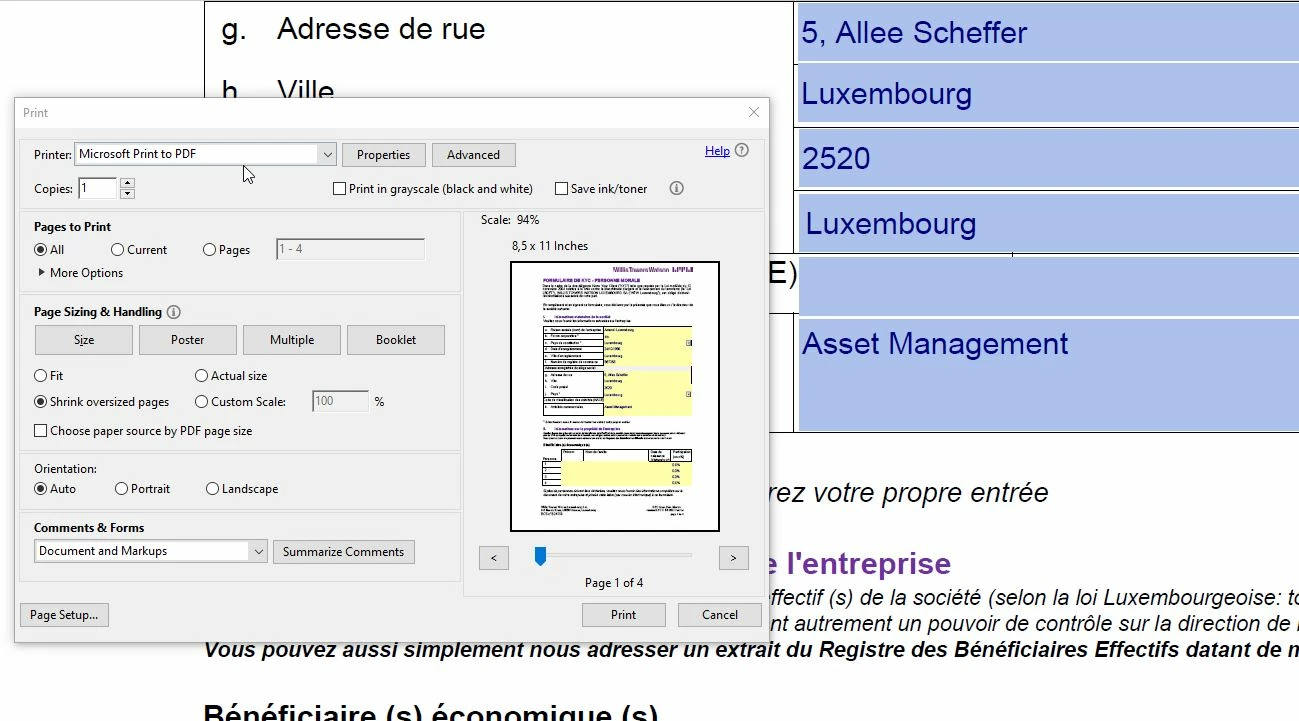
 

This topic is closed to new replies. Start a new post to keep the conversation going.
Bernd Alheit
Bernd AlheitCorrect answer
Community Expert
Aug 26, 2022 1:00 PM UTC

May be that the creator of the form uses yellow for the form fields.

3 replies

Bernd Alheit
Community Expert
Bernd AlheitCommunity ExpertCorrect answer
Community Expert
Aug 26, 2022 1:00 PM UTC

May be that the creator of the form uses yellow for the form fields.

Translate
FilipeluxAuthor
Participant
Aug 31, 2022 2:35 PM UTC

It could be because several colleagues tried with their own adobe reader (even with other 3rd party apps) and have the same case. I will ask the user to request the owner of the file to change this color...or simply remove it.
Thanks for your help!


Translate
Legend
Aug 26, 2022 12:51 PM UTC

I don't know why it prints yellow, but highlighting is just a helper for the screen, on your own computer only. Don't expect it to print. 

Translate