
Known Participant
April 29, 2019
Answered

Where are the comment tools in Reader DC?

  • April 29, 2019
  • 2 replies
  • 5594 views

I exported a document from InDesign to Acrobat. I then used Acrobat and did Save As Other > Reader Extended PDF > Enable Commenting and Measuring. But when I open the document in Reader DC, I still can't find any commenting tools except for the sticky note and highlighter. There's a Document Extensions note that says "You can add comments and markups to this document," but I can't find any way to do that. I've looked through all the menu options...what am I missing...??

Please don't point out that I can mark up a document using Acrobat; I know that. I'm trying to create a "How-to" document for users who only have Reader. I know it used to be possible for users with Reader to comment in a PDF, but I don't see that anymore.
    This topic has been closed for replies.
    Correct answer Bernd Alheit

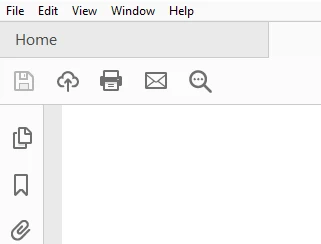
    There is no Tools tab:


    Repair the installation of Acrobat Reader DC.

    2 replies

    jane-e
    Community Expert
    Community Expert
    April 30, 2019

    JG_ABB  wrote

    I know it used to be possible for users with Reader to comment in a PDF.

    Hi,

    You need to open the Comment toobar to see the other tools in Reader DC: Tools > Comments. Here is Help:

    Use annotation and drawing markup tools to add comments in PDFs, Adobe Acrobat and Acrobat Reader

    If your users have Reader XI or DC, you no longer need to enable commenting. It is now part of Reader.

    Jane

    Known Participant
    April 30, 2019

    Hi Jane - There's no top menu option for Tools. Under the View menu, there's a Tools option, but the only thing there is "Send for review."

    Legend
    April 30, 2019

    Yes there is no top menu for tools any more. Completely redesigned, several times, no use trying to follow old instructions. Explore. Use the Tools tab.

    Bernd Alheit
    Community Expert
    Community Expert
    April 30, 2019

    What happens when you save the file without Reader Extension?

    Known Participant
    April 30, 2019

    Hi Bernd - When I save it without it, I don't see the "document extensions" note, but otherwise it looks the same.