
Inspiring
May 4, 2026
Answered

Where can I find AcrobatReaderDC_23.003.20201.msi?

  • May 4, 2026
  • 2 replies
  • 26 views

Hello,

I have installed Version 25.001.21288 an trying to update to 26.001.21529 using WinGet.

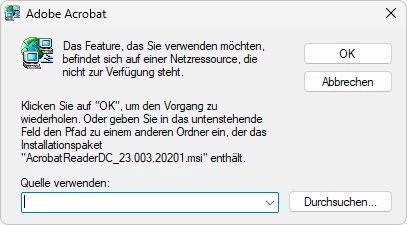
WinGet downloads AcroRdrDCx642600121529_MUI.exe and this prompts me to provide AcrobatReaderDC_23.003.20201.msi which I currently can’t find.

Where can I download that file to complete the installation?


C:\>winget list Adobe.Acrobat.Reader.64-bit
Name ID Version Verfügbar Quelle
-----------------------------------------------------------------------------------
Adobe Acrobat (64-bit) Adobe.Acrobat.Reader.64-bit 25.001.21288 26.001.21529 winget

C:\>winget update Adobe.Acrobat.Reader.64-bit
Gefunden Adobe Acrobat Reader (64-bit) [Adobe.Acrobat.Reader.64-bit] Version 26.001.21529
Diese Anwendung wird von ihrem Besitzer an Sie lizenziert.
Microsoft ist nicht verantwortlich und erteilt keine Lizenzen für Pakete von Drittanbietern.
Download läuft https://ardownload2.adobe.com/pub/adobe/acrobat/win/AcrobatDC/2600121529/AcroRdrDCx642600121529_MUI.exe
██████████████████████████████ 778 MB / 778 MB
Der Installer-Hash wurde erfolgreich überprüft
Paketinstallation wird gestartet...
Installation fehlgeschlagen mit Exitcode: 1603
Das Installationsprotokoll ist verfügbar unter: C:\Users\Username\AppData\Local\Packages\Microsoft.DesktopAppInstaller_8wekyb3d8bbwe\LocalState\DiagOutputDir\Adobe.Acrobat.Reader.64-bit.26.001.21529-26-05-04-19-03-23.log

C:\>


Thank you in advance.

    Correct answer default5kue4kpyfpsa
    1. Open https://get.adobe.com/reader/enterprise/ with Microsoft Edge
    2. Select Operating system: Windows 11 or Windows 10
    3. Select Language: All Languages (MUI)
    4. Select Version: Reader 2026.001.21529 MUI for Windows-64bit
    5. Click on “Download Acrobat Reader”
    6. It opens “Downloads” (the download manager) and tries to download “AcroRdrDCx642600121529_MUI.exe”
    7. Instead of clicking any button, do a right click and select “Copy link address”
      https://ardownload3.adobe.com/pub/adobe/acrobat/win/AcrobatDC/2600121529/AcroRdrDCx642600121529_MUI.exe


    8. Rename the the folder and filename : …/2300320201/AcroRdrDCx642300320201_MUI.exe
      https://ardownload3.adobe.com/pub/adobe/acrobat/win/AcrobatDC/2300320201/AcroRdrDCx642300320201_MUI.exe


    9. Open the link and download AcroRdrDCx642300320201_MUI.exe.
    10. Open Windows Explorer
    11. Click in the Address bar, type cmd to start command prompt in that folder
    12. Run the following command to extract the installation files: 
      AcroRdrDCx642300320201_MUI.exe -sfx_o"%CD%\AcroRdrDCx642300320201_MUI" -sfx_ne


    13. Rename “AcroPro.msi” to “AcrobatReaderDC_23.003.20201.msi”
    14. In the waiting installer Popup click Browse… and select the “AcrobatReaderDC_23.003.20201.msi”.
    15. Installation failed again but this time it was successful
      C:\>winget update Adobe.Acrobat.Reader.64-bit
      Gefunden Adobe Acrobat Reader (64-bit) [Adobe.Acrobat.Reader.64-bit] Version 26.001.21529
      Diese Anwendung wird von ihrem Besitzer an Sie lizenziert.
      Microsoft ist nicht verantwortlich und erteilt keine Lizenzen für Pakete von Drittanbietern.
      Der Installer-Hash wurde erfolgreich überprüft
      Paketinstallation wird gestartet...
      Installation fehlgeschlagen mit Exitcode: 3221226356
      Das Installationsprotokoll ist verfügbar unter: C:\Users\Username\AppData\Local\Packages\Microsoft.DesktopAppInstaller_8wekyb3d8bbwe\LocalState\DiagOutputDir\Adobe.Acrobat.Reader.64-bit.26.001.21529-26-05-04-20-10-45.log

      C:\>winget update Adobe.Acrobat.Reader.64-bit
      Kein verfügbares Upgrade gefunden.
      In den konfigurierten Quellen sind keine neueren Paketversionen verfügbar.

      C:\>winget list Adobe.Acrobat.Reader.64-bit
      Name ID Version Quelle
      -----------------------------------------------------------------------
      Adobe Acrobat (64-bit) Adobe.Acrobat.Reader.64-bit 26.001.21529 winget

      C:\>


    2 replies

    Meenakshi0101
    Community Manager
    Community Manager
    May 5, 2026

    Hi default5kue4kpyfpsa,


    Thank you for reaching out, and sorry for the delay in response.


    We see that you have already found the steps. Thank you for sharing them here as it may help others with similar questions.


    Let us know if we can be of any help.


    Thanks,

    Meenakshi

    default5kue4kpyfpsaAuthorCorrect answer
    Inspiring
    May 4, 2026
    1. Open https://get.adobe.com/reader/enterprise/ with Microsoft Edge
    2. Select Operating system: Windows 11 or Windows 10
    3. Select Language: All Languages (MUI)
    4. Select Version: Reader 2026.001.21529 MUI for Windows-64bit
    5. Click on “Download Acrobat Reader”
    6. It opens “Downloads” (the download manager) and tries to download “AcroRdrDCx642600121529_MUI.exe”
    7. Instead of clicking any button, do a right click and select “Copy link address”
      https://ardownload3.adobe.com/pub/adobe/acrobat/win/AcrobatDC/2600121529/AcroRdrDCx642600121529_MUI.exe


    8. Rename the the folder and filename : …/2300320201/AcroRdrDCx642300320201_MUI.exe
      https://ardownload3.adobe.com/pub/adobe/acrobat/win/AcrobatDC/2300320201/AcroRdrDCx642300320201_MUI.exe


    9. Open the link and download AcroRdrDCx642300320201_MUI.exe.
    10. Open Windows Explorer
    11. Click in the Address bar, type cmd to start command prompt in that folder
    12. Run the following command to extract the installation files: 
      AcroRdrDCx642300320201_MUI.exe -sfx_o"%CD%\AcroRdrDCx642300320201_MUI" -sfx_ne


    13. Rename “AcroPro.msi” to “AcrobatReaderDC_23.003.20201.msi”
    14. In the waiting installer Popup click Browse… and select the “AcrobatReaderDC_23.003.20201.msi”.
    15. Installation failed again but this time it was successful
      C:\>winget update Adobe.Acrobat.Reader.64-bit
      Gefunden Adobe Acrobat Reader (64-bit) [Adobe.Acrobat.Reader.64-bit] Version 26.001.21529
      Diese Anwendung wird von ihrem Besitzer an Sie lizenziert.
      Microsoft ist nicht verantwortlich und erteilt keine Lizenzen für Pakete von Drittanbietern.
      Der Installer-Hash wurde erfolgreich überprüft
      Paketinstallation wird gestartet...
      Installation fehlgeschlagen mit Exitcode: 3221226356
      Das Installationsprotokoll ist verfügbar unter: C:\Users\Username\AppData\Local\Packages\Microsoft.DesktopAppInstaller_8wekyb3d8bbwe\LocalState\DiagOutputDir\Adobe.Acrobat.Reader.64-bit.26.001.21529-26-05-04-20-10-45.log

      C:\>winget update Adobe.Acrobat.Reader.64-bit
      Kein verfügbares Upgrade gefunden.
      In den konfigurierten Quellen sind keine neueren Paketversionen verfügbar.

      C:\>winget list Adobe.Acrobat.Reader.64-bit
      Name ID Version Quelle
      -----------------------------------------------------------------------
      Adobe Acrobat (64-bit) Adobe.Acrobat.Reader.64-bit 26.001.21529 winget

      C:\>